> ## Documentation Index
> Fetch the complete documentation index at: https://docs.beam.cloud/llms.txt
> Use this file to discover all available pages before exploring further.
# Cold Start Performance
This page covers a list of optimizations to make your containers boot up as fast as possible.
# Cold Start Optimizations
## Cache Models in Volumes
To avoid downloading your models from the internet on each request, you can cache them in Beam's Volumes.
In the example below, the models are saved to the Volume by passing the `cache_dir` argument in the Huggingface Transformers method:
```python theme={null}
from beam import Image, endpoint, Volume
# Path to cache model weights
CACHE_PATH = "./weights"
@endpoint(
volumes=[Volume(name="weights", mount_path=CACHE_PATH)],
cpu=1,
memory="16Gi",
gpu="T4",
image=Image(
python_version="python3.9",
python_packages=[
"transformers",
"torch",
],
),
)
def predict():
from transformers import AutoTokenizer, OPTForCausalLM
import torch
model = OPTForCausalLM.from_pretrained("facebook/opt-125m", cache_dir=CACHE_PATH)
# Run inference
model.generate(...)
return {"text": ""}
```
Alternatively, if you want to use Transformers' pipeline abstraction, you can pass the `cache_dir` argument to the underlying models using the `model_kwargs` argument of the pipeline:
```python theme={null}
from beam import Image, endpoint, Volume
# Path to cache model weights
CACHE_PATH = "./weights"
@endpoint(
volumes=[Volume(name="weights", mount_path=CACHE_PATH)],
...
)
def predict():
from transformers import pipeline
# Load the model
generator = pipeline(
"text-generation",
model="facebook/opt-125m",
model_kwargs={"cache_dir": CACHE_PATH},
)
# Run inference
generator(...)
return {"text": ""}
```
## Load Models Using `on_start`
In addition to using a Volume, it's best-practice to ensure models are only loaded *once* when the container first starts. Beam lets you define an `on_start` function that will run exactly *once* when the container first starts:
This example combines the `on_start` functionality with the Volume caching:
```python theme={null}
from beam import Image, endpoint, Volume
# Path to cache model weights
CACHE_PATH = "./weights"
# This runs once when the container first starts
def download_models():
from transformers import AutoTokenizer, OPTForCausalLM
import torch
model = OPTForCausalLM.from_pretrained("facebook/opt-125m", cache_dir=CACHE_PATH)
return model
@endpoint(
on_start=download_models,
volumes=[Volume(name="weights", mount_path=CACHE_PATH)],
cpu=1,
memory="16Gi",
gpu="T4",
image=Image(
python_version="python3.9",
python_packages=[
"transformers",
"torch",
],
),
)
def predict(context):
# Retrieve cached model and tokenizer from on_start function
model = context.on_start_value
# Run inference
model.generate(...)
return {"text": ""}
```
## Enable Checkpoint Restore (New)
This allows you to specify a `checkpoint_enabled` flag on your decorator, which will capture a memory snapshot of the running container after `on_start` completes. This means that you can load a model onto a GPU, run some setup logic, and when the app cold starts, it will start *right from that point*.
```python theme={null}
@endpoint(
secrets=["HF_TOKEN"],
on_start=load_models,
name="meta-llama-3.1-8b-instruct",
cpu=2,
memory="16Gi",
gpu="H100",
keep_warm_seconds=30,
checkpoint_enabled=True # Add this field!
)
```
Checkpoint restore is available on these GPU types:
* RTX4090
* H100
* A10G
### Notes
* If checkpoint fails, please forward us any errors that appear in logs. It's likely the reason for failure is a missing volume -- to resolve that you need to ensure the cache path is set properly for the model.
* If checkpoint fails, the deployment will revert to standard cold boots. To try checkpointing again, you will need to redeploy.
Checkpoints can take up to 3 minutes to capture, and 5 minutes to distribute
among our servers. To properly benchmark the cold start improvement, you need
to call the app after it has been spun down for a few minutes. Otherwise it
may block as the checkpoint is syncing.
## Measuring Cold Start
We've made it easier to optimize your cold starts by adding a cold start profile to each task.
You can view the cold start profile of a task by clicking on any task in the tasks table.
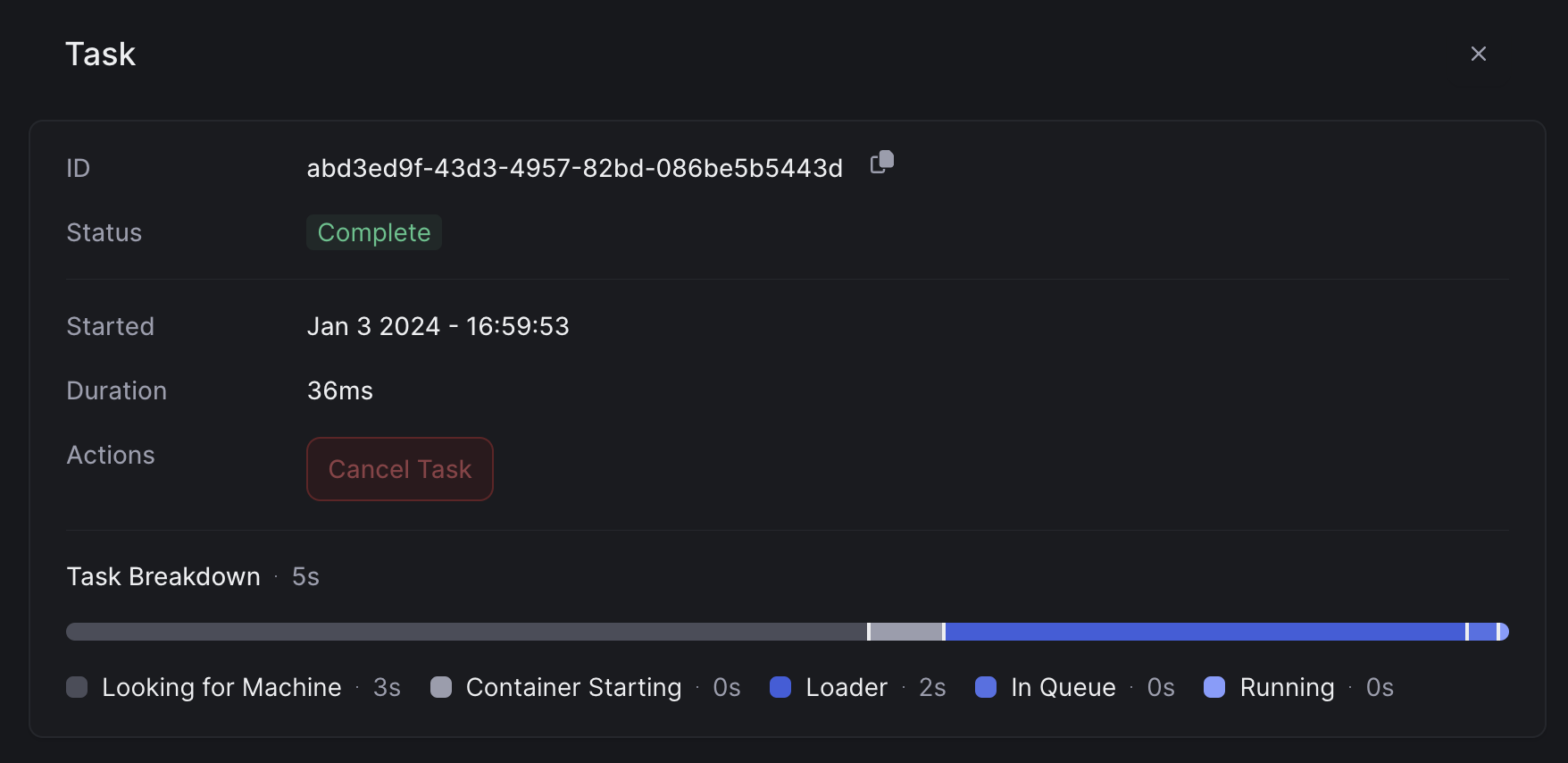 This breakdown shows the entire lifecycle of your task: spinning up a container, running your `on_start` function, and running the task itself.
Here's a breakdown of a serverless cold start:
* **Container Start Time**. This is typically under 1s.
* **Image Load Time**. Pulling your container image from our image cache. This varies based on the size of your model and the dependencies you've added.
* **Application Start Time**. Running your code. This is the time running your `on_start`, and loading it on the GPU.
This breakdown shows the entire lifecycle of your task: spinning up a container, running your `on_start` function, and running the task itself.
Here's a breakdown of a serverless cold start:
* **Container Start Time**. This is typically under 1s.
* **Image Load Time**. Pulling your container image from our image cache. This varies based on the size of your model and the dependencies you've added.
* **Application Start Time**. Running your code. This is the time running your `on_start`, and loading it on the GPU.