> ## Documentation Index
> Fetch the complete documentation index at: https://docs.beam.cloud/llms.txt
> Use this file to discover all available pages before exploring further.
# Integrate into CI/CD
> You can integrate Beam into an existing CI/CD process to deploy your code automatically.
## Automated Deploys
It's fairly straightforward to setup automation for deploying your code to Beam. At a high level, the following steps are all you need:
```sh theme={null}
pip3 install --upgrade pip
pip3 install beam-client
beam configure default --token $BEAM_TOKEN
beam deploy file.py:function
```
## Example: Github Actions
You can setup a Github workflow to deploy your code whenever a new commit is made to your Git repo.
### Setup Environment Variables
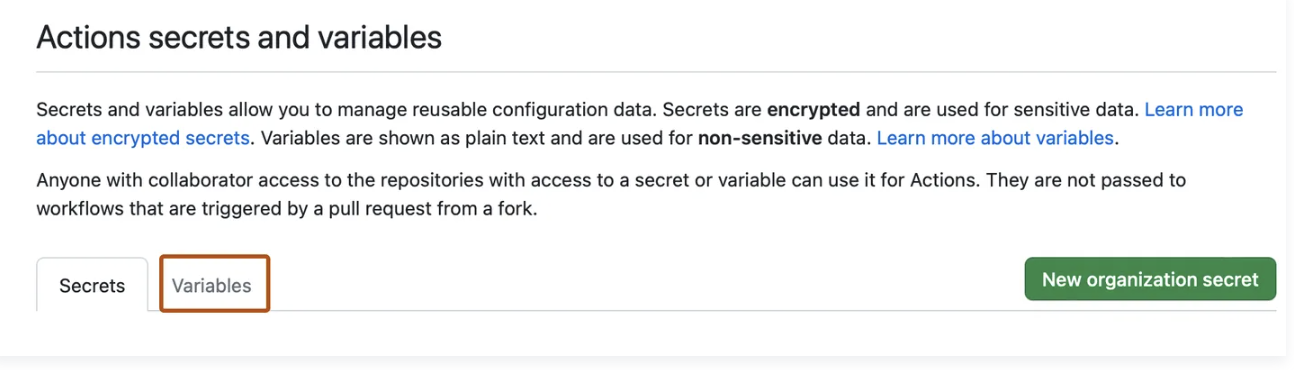
First, add your `BEAM_TOKEN` to your [Github Secrets](https://docs.github.com/en/actions/security-guides/using-secrets-in-github-actions#creating-secrets-for-a-repository):

 ### Create Actions file
For a detailed walk-through of this step, [Github's
documentation](https://docs.github.com/en/actions/quickstart) is the best
resource.
1. Create a directory called `.github/workflows` in your project.
2. In the `.github/workflows` directory, create a file named `beam-actions.yml`
### Deploying to Different Environments
You might want to setup separate Beam apps for your `staging` or `prod` environments.
In your Beam app, you can setup your app name to dynamically update based on the Github branch you've deployed to. `BEAM_DEPLOY_ENV` will get set in our Github Actions script, based on the branch name:
```python app.py theme={null}
from beam import endpoint
import os
@endpoint(name=f'app-{os.getenv("BEAM_DEPLOY_ENV", "staging")}')
def handler():
return {}
```
If you push to the `main` branch, the app `app-prod` will be deployed. If you push to the `staging` branch, `app-staging` will be deployed. You can customize this with your own branch names.
Here's what the Github Action looks like. Make sure you've added a `BEAM_TOKEN` to your [Github Secrets](https://docs.github.com/en/actions/security-guides/using-secrets-in-github-actions#creating-secrets-for-a-repository):
```yaml beam-actions.yml theme={null}
name: Deploy to Beam
on:
push:
branches:
- main
- staging
jobs:
deploy:
runs-on: ubuntu-latest
steps:
- uses: actions/checkout@v3
- name: Set environment variables
run: |
if [[ "${{ github.ref }}" == 'refs/heads/main' ]]; then
echo "Setting environment variables: PROD"
echo "BEAM_DEPLOY_ENV=prod" >> $GITHUB_ENV
elif [[ "${{ github.ref }}" == 'refs/heads/staging' ]]; then
echo "Setting environment variables: STAGING"
echo "BEAM_DEPLOY_ENV=staging" >> $GITHUB_ENV
fi
- name: Authenticate and deploy to Beam
env:
BEAM_TOKEN: ${{ secrets.BEAM_TOKEN }}
run: |
pip3 install --upgrade pip
pip3 install beam-client
pip3 install fastapi
echo "beam configure default --token $BEAM_TOKEN"
beam configure default --token $BEAM_TOKEN
beam deploy app.py:function
```
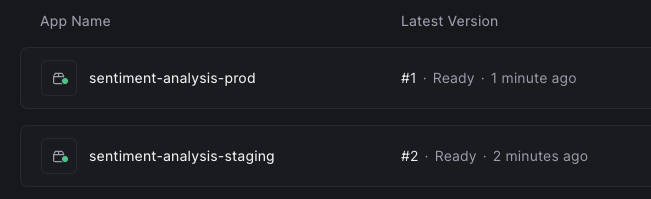
When you push to either `main` or `staging`, a new app will be deployed for each push:
### Create Actions file
For a detailed walk-through of this step, [Github's
documentation](https://docs.github.com/en/actions/quickstart) is the best
resource.
1. Create a directory called `.github/workflows` in your project.
2. In the `.github/workflows` directory, create a file named `beam-actions.yml`
### Deploying to Different Environments
You might want to setup separate Beam apps for your `staging` or `prod` environments.
In your Beam app, you can setup your app name to dynamically update based on the Github branch you've deployed to. `BEAM_DEPLOY_ENV` will get set in our Github Actions script, based on the branch name:
```python app.py theme={null}
from beam import endpoint
import os
@endpoint(name=f'app-{os.getenv("BEAM_DEPLOY_ENV", "staging")}')
def handler():
return {}
```
If you push to the `main` branch, the app `app-prod` will be deployed. If you push to the `staging` branch, `app-staging` will be deployed. You can customize this with your own branch names.
Here's what the Github Action looks like. Make sure you've added a `BEAM_TOKEN` to your [Github Secrets](https://docs.github.com/en/actions/security-guides/using-secrets-in-github-actions#creating-secrets-for-a-repository):
```yaml beam-actions.yml theme={null}
name: Deploy to Beam
on:
push:
branches:
- main
- staging
jobs:
deploy:
runs-on: ubuntu-latest
steps:
- uses: actions/checkout@v3
- name: Set environment variables
run: |
if [[ "${{ github.ref }}" == 'refs/heads/main' ]]; then
echo "Setting environment variables: PROD"
echo "BEAM_DEPLOY_ENV=prod" >> $GITHUB_ENV
elif [[ "${{ github.ref }}" == 'refs/heads/staging' ]]; then
echo "Setting environment variables: STAGING"
echo "BEAM_DEPLOY_ENV=staging" >> $GITHUB_ENV
fi
- name: Authenticate and deploy to Beam
env:
BEAM_TOKEN: ${{ secrets.BEAM_TOKEN }}
run: |
pip3 install --upgrade pip
pip3 install beam-client
pip3 install fastapi
echo "beam configure default --token $BEAM_TOKEN"
beam configure default --token $BEAM_TOKEN
beam deploy app.py:function
```
When you push to either `main` or `staging`, a new app will be deployed for each push: