> ## Documentation Index
> Fetch the complete documentation index at: https://docs.beam.cloud/llms.txt
> Use this file to discover all available pages before exploring further.
# Scaling Out
You can scale out your app to multiple containers by adding autoscaling.
## Scaling Horizontally (Adding More Containers)
When you deploy a Task Queue or endpoint, Beam creates a queueing system that manages each task that's created when your API is called.
You can configure how Beam will scale based on how many things are in the task queue.
 ### Scale by Queue Depth
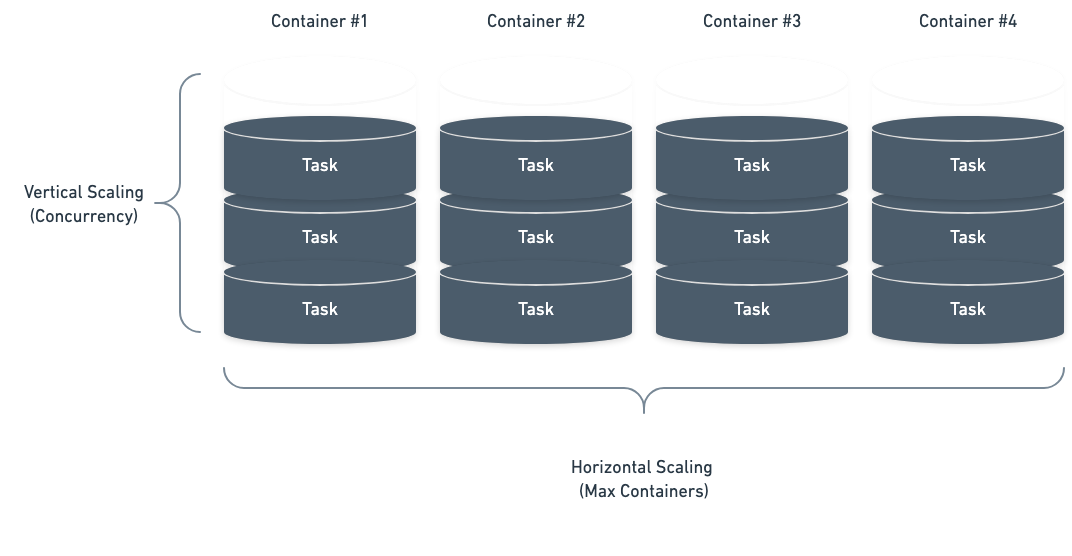
Our simplest autoscaling strategy allows you to scale by the number of tasks in the queue.
This allows you to control how many tasks each container can process before scaling up. For example, you could setup an autoscaler to run 30 tasks per container. When you pass 30 tasks in your queue,
we will add a container. When you pass 60, we'll add another containers (up until `max_containers` is reached).
```python theme={null}
from beam import QueueDepthAutoscaler, endpoint
autoscaling_config = QueueDepthAutoscaler(
max_containers=5,
tasks_per_container=30,
)
@endpoint(autoscaler=autoscaling_config)
def function():
...
```
## Setting Always-On Containers
Any running containers count towards billable usage. Take care to avoid
setting `min_containers` unless you're comfortable paying for usage 24/7.
You can configure the number of containers running at baseline using the `min_containers` field.
By setting `min_containers=1`, 1 container will *always* remain running until the deployment is stopped.
```python theme={null}
from beam import endpoint, QueueDepthAutoscaler
@endpoint(
autoscaler=QueueDepthAutoscaler(
min_containers=1, max_containers=3, tasks_per_container=1
),
)
def handler():
return {"success": "true"}
```
If you redeploy an app that has `min_containers` set, make sure to explicitly
stop the previous deployment versions in order to avoid running containers
that you are no longer using.
### Scale by Queue Depth
Our simplest autoscaling strategy allows you to scale by the number of tasks in the queue.
This allows you to control how many tasks each container can process before scaling up. For example, you could setup an autoscaler to run 30 tasks per container. When you pass 30 tasks in your queue,
we will add a container. When you pass 60, we'll add another containers (up until `max_containers` is reached).
```python theme={null}
from beam import QueueDepthAutoscaler, endpoint
autoscaling_config = QueueDepthAutoscaler(
max_containers=5,
tasks_per_container=30,
)
@endpoint(autoscaler=autoscaling_config)
def function():
...
```
## Setting Always-On Containers
Any running containers count towards billable usage. Take care to avoid
setting `min_containers` unless you're comfortable paying for usage 24/7.
You can configure the number of containers running at baseline using the `min_containers` field.
By setting `min_containers=1`, 1 container will *always* remain running until the deployment is stopped.
```python theme={null}
from beam import endpoint, QueueDepthAutoscaler
@endpoint(
autoscaler=QueueDepthAutoscaler(
min_containers=1, max_containers=3, tasks_per_container=1
),
)
def handler():
return {"success": "true"}
```
If you redeploy an app that has `min_containers` set, make sure to explicitly
stop the previous deployment versions in order to avoid running containers
that you are no longer using.