> ## Documentation Index
> Fetch the complete documentation index at: https://docs.beam.cloud/llms.txt
> Use this file to discover all available pages before exploring further.
# July 22, 2024
 # 0.2.58
## Features
* Added support for private AWS ECR images in the SDK
* Added support to delete volumes in the CLI
* Added `stats.active_containers` and `stats.queue_depth` to the `v2/task/` endpoint
* Added displaying public endpoint URLs when calling `beam deploy`
* Added tailing logs using `--stub-id` with the `beam logs` command
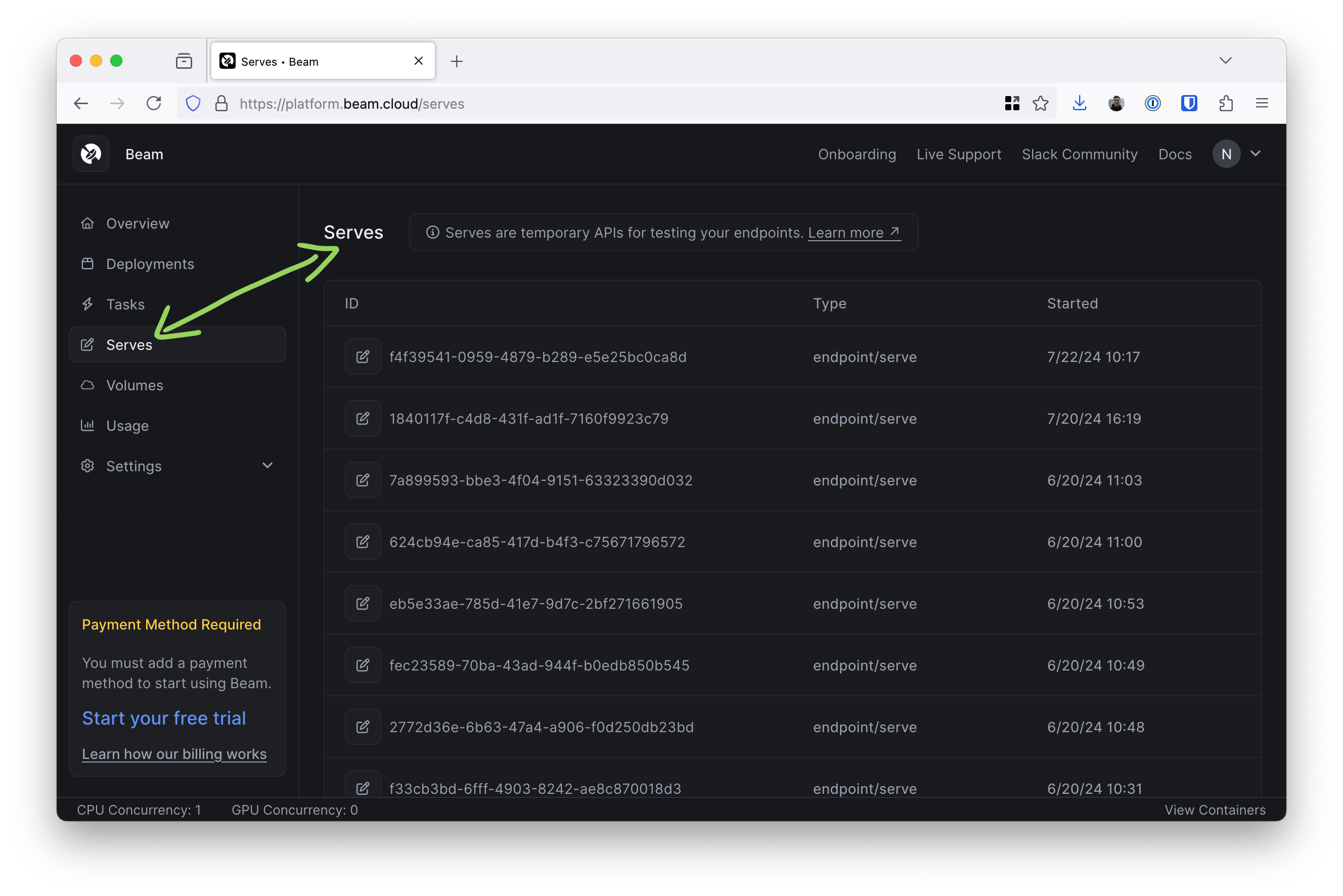
* Added a Serves page to the dashboard
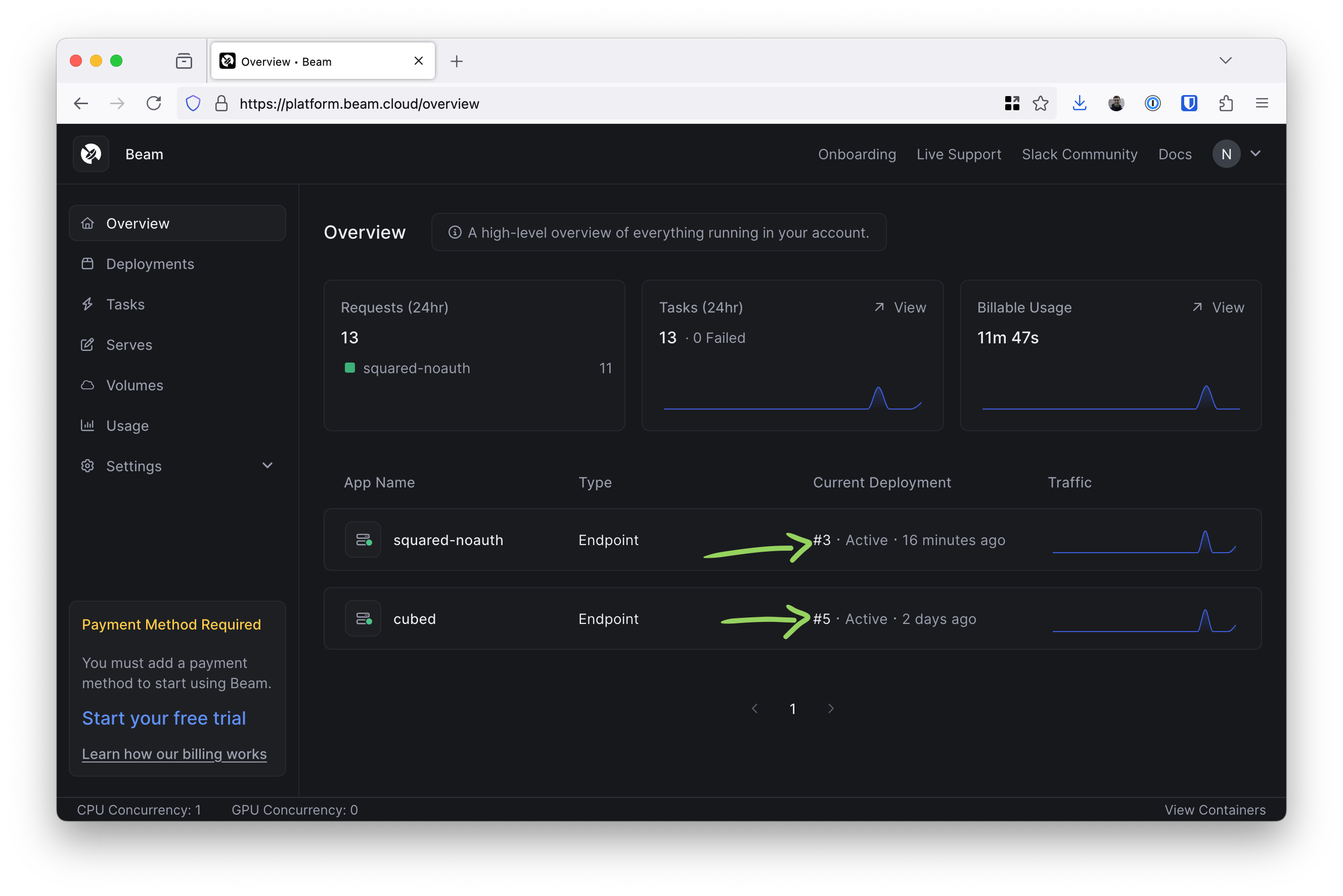
* Overview page now only shows the latest Deployment and not all versions of all deployments
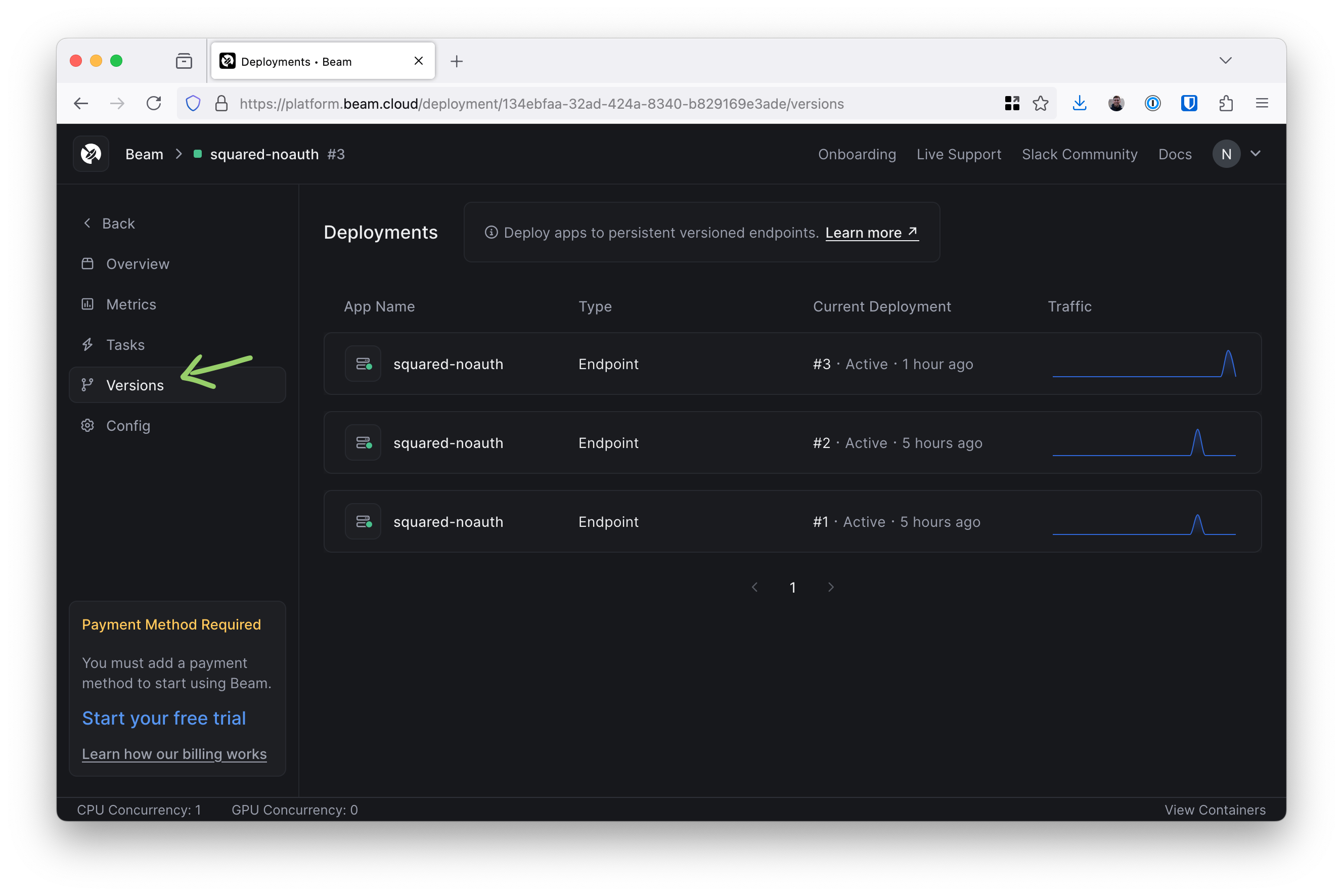
* Added a Versions page to the Deployment page
## Bug Fixes
* Fixed temp file creation in SDK when syncing files on Windows
## How to update
```sh theme={null}
uv tool upgrade beam-client
```
## Use private AWS ECR images
Export your AWS credentials in your shell and pass the environment variable names to `base_image_creds` as a list. This syntax will lookup the environment variable values for you.
```python theme={null}
image = Image(
base_image="111111111111.dkr.ecr.us-east-1.amazonaws.com/my-app:latest",
base_image_creds=[
"AWS_ACCESS_KEY_ID",
"AWS_SECRET_ACCESS_KEY",
"AWS_SESSION_TOKEN",
"AWS_REGION",
],
)
@endpoint(image=image)
def squared(i: int = 0) -> int:
return i**2
```
We also accept a dict where you can provide the values.
```python theme={null}
image = Image(
base_image="111111111111.dkr.ecr.us-east-1.amazonaws.com/my-app:latest",
base_image_creds={
"AWS_ACCESS_KEY_ID": "xxxx",
"AWS_SECRET_ACCESS_KEY": "xxxx"
"AWS_REGION": "xxxx"
},
)
```
You can authenticate with either your static AWS credentials or an AWS STS
token. The latter requires that the `AWS_SESSION_TOKEN` key be set.
## Delete a volume
You can now delete volumes using the following command.
```sh theme={null}
beam volume delete my-volume-name
```
## Getting stats from the task API
We've added a new `stats` object to the task API response. It includes the number of active containers and queue depth of tasks.
```sh theme={null}
curl -H 'Authorization: Bearer ' https://api.beam.cloud/v2/task/07ce4078-bccc-4a42-b530-5f2653484a6a/ | jq
{
"id": "07ce4078-bccc-4a42-b530-5f2653484a6a",
"started_at": "2024-07-22T14:02:28.466278Z",
"ended_at": "2024-07-22T14:02:28.475954Z",
"status": "COMPLETE",
"container_id": "endpoint-d327e987-759d-493e-b3e4-005774bcf998-8b747792",
"updated_at": "2024-07-22T14:02:28.477026Z",
"created_at": "2024-07-22T14:02:28.413232Z",
"outputs": [],
"stats": {
"active_containers": 0,
"queue_depth": 0
},
"stub": {
"id": "d327e987-759d-493e-b3e4-005774bcf998",
"name": "endpoint/deployment/app:squared",
"type": "",
"config": "{\"runtime\":{\"cpu\":1000,\"gpu\":\"\",\"memory\":128,\"image_id\":\"4724a2a2dfb601d8\"},\"handler\":\"app:squared\",\"on_start\":\"\",\"python_version\":\"python3.10\",\"keep_warm_seconds\":180,\"max_pending_tasks\":100,\"callback_url\":\"\",\"task_policy\":{\"max_retries\":0,\"timeout\":180,\"expires\":\"0001-01-01T00:00:00Z\"},\"workers\":1,\"authorized\":false,\"volumes\":null,\"autoscaler\":{\"type\":\"queue_depth\",\"max_containers\":1,\"tasks_per_container\":1}}",
"config_version": 0,
"object_id": 0,
"created_at": "0001-01-01T00:00:00Z",
"updated_at": "0001-01-01T00:00:00Z"
}
}
```
## Public URL displayed in CLI
Calling `beam deploy` has always showed the URL of your app, but it didn't show the public URL when an endpoint had `authorized=False` set until today.
Here's an example endpoint.
```python theme={null}
@endpoint(authorized=False)
def squared(i: int = 0):
print(f"{i**2=}")
return i**2
```
Let's deploy it and see what the URL looks like.
```sh theme={null}
beam deploy app.py:squared --name squared-noauth
=> Building image
=> Using cached image
=> Syncing files
Reading .beta9ignore file
Collecting files from /Users/nick/Projects/beam-client/test
Added /Users/nick/Projects/beam-client/test/.beamignore
Added /Users/nick/Projects/beam-client/test/app.py
Added /Users/nick/Projects/beam-client/test/hello.txt
=> Files synced
=> Deploying endpoint
=> Deployed
=> Invocation details
curl -X POST 'https://app.beam.cloud/endpoint/public/a060102b-04d1-4248-8083-bc71c0e49975' \
-H 'Connection: keep-alive' \
-H 'Content-Type: application/json' \
-d '{}'
```
## Using stub ID to tail logs
We've added --stub-id to the `beam logs` command. Here's how it can be used.
Go to [platform.beam.cloud](https://platform.beam.cloud) and click on your deployment then click the copy button next to "Stub ID".
Use the stub Id in the following command.
```sh theme={null}
beam logs --stub-id a060102b-04d1-4248-8083-bc71c0e49975
[2024-07-22 18:08:54 +0000] [1] [INFO] Starting gunicorn 20.1.0
[2024-07-22 18:08:54 +0000] [1] [INFO] Listening at: http://[::]:38311 (1)
[2024-07-22 18:08:54 +0000] [1] [INFO] Using worker: uvicorn.workers.UvicornWorker
[2024-07-22 18:08:54 +0000] [7] [INFO] Booting worker with pid: 7
[2024-07-22 18:08:56 +0000] [7] [INFO] Started server process [7]
[2024-07-22 18:08:56 +0000] [7] [INFO] Waiting for application startup.
[2024-07-22 18:08:56 +0000] [7] [INFO] Application startup complete.
Received task
i**2=0
2024-07-22 18:08:56,856 - INFO - 2600:1f18:4df4:404:9539::2:49002 - "POST / HTTP/1.1" 200
Received task <3f96aa85-182f-42b2-bea5-f74a96c9a1e6>
i**2=0
2024-07-22 18:09:06,897 - INFO - 2600:1f18:4df4:406:2b0a::2:46870 - "POST / HTTP/1.1" 200
Received task
i**2=25
2024-07-22 18:09:18,459 - INFO - 2600:1f18:4df4:405:71ac::1:57046 - "POST / HTTP/1.1" 200
[2024-07-22 18:12:18 +0000] [1] [INFO] Handling signal: term
[2024-07-22 18:12:18 +0000] [7] [INFO] Shutting down
[2024-07-22 18:12:18 +0000] [7] [INFO] Waiting for application shutdown.
[2024-07-22 18:12:18 +0000] [7] [INFO] Application shutdown complete.
[2024-07-22 18:12:18 +0000] [7] [INFO] Finished server process [7]
[2024-07-22 18:12:18 +0000] [1] [WARNING] Worker with pid 7 was terminated due to signal 15
[2024-07-22 18:12:18 +0000] [1] [INFO] Shutting down: Master
⠹ Streaming...
```
## Serves on the dashboard
Serves is back on the menu! You can find them on the dashboard.
# 0.2.58
## Features
* Added support for private AWS ECR images in the SDK
* Added support to delete volumes in the CLI
* Added `stats.active_containers` and `stats.queue_depth` to the `v2/task/` endpoint
* Added displaying public endpoint URLs when calling `beam deploy`
* Added tailing logs using `--stub-id` with the `beam logs` command
* Added a Serves page to the dashboard
* Overview page now only shows the latest Deployment and not all versions of all deployments
* Added a Versions page to the Deployment page
## Bug Fixes
* Fixed temp file creation in SDK when syncing files on Windows
## How to update
```sh theme={null}
uv tool upgrade beam-client
```
## Use private AWS ECR images
Export your AWS credentials in your shell and pass the environment variable names to `base_image_creds` as a list. This syntax will lookup the environment variable values for you.
```python theme={null}
image = Image(
base_image="111111111111.dkr.ecr.us-east-1.amazonaws.com/my-app:latest",
base_image_creds=[
"AWS_ACCESS_KEY_ID",
"AWS_SECRET_ACCESS_KEY",
"AWS_SESSION_TOKEN",
"AWS_REGION",
],
)
@endpoint(image=image)
def squared(i: int = 0) -> int:
return i**2
```
We also accept a dict where you can provide the values.
```python theme={null}
image = Image(
base_image="111111111111.dkr.ecr.us-east-1.amazonaws.com/my-app:latest",
base_image_creds={
"AWS_ACCESS_KEY_ID": "xxxx",
"AWS_SECRET_ACCESS_KEY": "xxxx"
"AWS_REGION": "xxxx"
},
)
```
You can authenticate with either your static AWS credentials or an AWS STS
token. The latter requires that the `AWS_SESSION_TOKEN` key be set.
## Delete a volume
You can now delete volumes using the following command.
```sh theme={null}
beam volume delete my-volume-name
```
## Getting stats from the task API
We've added a new `stats` object to the task API response. It includes the number of active containers and queue depth of tasks.
```sh theme={null}
curl -H 'Authorization: Bearer ' https://api.beam.cloud/v2/task/07ce4078-bccc-4a42-b530-5f2653484a6a/ | jq
{
"id": "07ce4078-bccc-4a42-b530-5f2653484a6a",
"started_at": "2024-07-22T14:02:28.466278Z",
"ended_at": "2024-07-22T14:02:28.475954Z",
"status": "COMPLETE",
"container_id": "endpoint-d327e987-759d-493e-b3e4-005774bcf998-8b747792",
"updated_at": "2024-07-22T14:02:28.477026Z",
"created_at": "2024-07-22T14:02:28.413232Z",
"outputs": [],
"stats": {
"active_containers": 0,
"queue_depth": 0
},
"stub": {
"id": "d327e987-759d-493e-b3e4-005774bcf998",
"name": "endpoint/deployment/app:squared",
"type": "",
"config": "{\"runtime\":{\"cpu\":1000,\"gpu\":\"\",\"memory\":128,\"image_id\":\"4724a2a2dfb601d8\"},\"handler\":\"app:squared\",\"on_start\":\"\",\"python_version\":\"python3.10\",\"keep_warm_seconds\":180,\"max_pending_tasks\":100,\"callback_url\":\"\",\"task_policy\":{\"max_retries\":0,\"timeout\":180,\"expires\":\"0001-01-01T00:00:00Z\"},\"workers\":1,\"authorized\":false,\"volumes\":null,\"autoscaler\":{\"type\":\"queue_depth\",\"max_containers\":1,\"tasks_per_container\":1}}",
"config_version": 0,
"object_id": 0,
"created_at": "0001-01-01T00:00:00Z",
"updated_at": "0001-01-01T00:00:00Z"
}
}
```
## Public URL displayed in CLI
Calling `beam deploy` has always showed the URL of your app, but it didn't show the public URL when an endpoint had `authorized=False` set until today.
Here's an example endpoint.
```python theme={null}
@endpoint(authorized=False)
def squared(i: int = 0):
print(f"{i**2=}")
return i**2
```
Let's deploy it and see what the URL looks like.
```sh theme={null}
beam deploy app.py:squared --name squared-noauth
=> Building image
=> Using cached image
=> Syncing files
Reading .beta9ignore file
Collecting files from /Users/nick/Projects/beam-client/test
Added /Users/nick/Projects/beam-client/test/.beamignore
Added /Users/nick/Projects/beam-client/test/app.py
Added /Users/nick/Projects/beam-client/test/hello.txt
=> Files synced
=> Deploying endpoint
=> Deployed
=> Invocation details
curl -X POST 'https://app.beam.cloud/endpoint/public/a060102b-04d1-4248-8083-bc71c0e49975' \
-H 'Connection: keep-alive' \
-H 'Content-Type: application/json' \
-d '{}'
```
## Using stub ID to tail logs
We've added --stub-id to the `beam logs` command. Here's how it can be used.
Go to [platform.beam.cloud](https://platform.beam.cloud) and click on your deployment then click the copy button next to "Stub ID".
Use the stub Id in the following command.
```sh theme={null}
beam logs --stub-id a060102b-04d1-4248-8083-bc71c0e49975
[2024-07-22 18:08:54 +0000] [1] [INFO] Starting gunicorn 20.1.0
[2024-07-22 18:08:54 +0000] [1] [INFO] Listening at: http://[::]:38311 (1)
[2024-07-22 18:08:54 +0000] [1] [INFO] Using worker: uvicorn.workers.UvicornWorker
[2024-07-22 18:08:54 +0000] [7] [INFO] Booting worker with pid: 7
[2024-07-22 18:08:56 +0000] [7] [INFO] Started server process [7]
[2024-07-22 18:08:56 +0000] [7] [INFO] Waiting for application startup.
[2024-07-22 18:08:56 +0000] [7] [INFO] Application startup complete.
Received task
i**2=0
2024-07-22 18:08:56,856 - INFO - 2600:1f18:4df4:404:9539::2:49002 - "POST / HTTP/1.1" 200
Received task <3f96aa85-182f-42b2-bea5-f74a96c9a1e6>
i**2=0
2024-07-22 18:09:06,897 - INFO - 2600:1f18:4df4:406:2b0a::2:46870 - "POST / HTTP/1.1" 200
Received task
i**2=25
2024-07-22 18:09:18,459 - INFO - 2600:1f18:4df4:405:71ac::1:57046 - "POST / HTTP/1.1" 200
[2024-07-22 18:12:18 +0000] [1] [INFO] Handling signal: term
[2024-07-22 18:12:18 +0000] [7] [INFO] Shutting down
[2024-07-22 18:12:18 +0000] [7] [INFO] Waiting for application shutdown.
[2024-07-22 18:12:18 +0000] [7] [INFO] Application shutdown complete.
[2024-07-22 18:12:18 +0000] [7] [INFO] Finished server process [7]
[2024-07-22 18:12:18 +0000] [1] [WARNING] Worker with pid 7 was terminated due to signal 15
[2024-07-22 18:12:18 +0000] [1] [INFO] Shutting down: Master
⠹ Streaming...
```
## Serves on the dashboard
Serves is back on the menu! You can find them on the dashboard.
 ## Overview page only shows latest version of deployment
We've made the Overview page a little cleaner by only showing the latest version of your deployments.
## Overview page only shows latest version of deployment
We've made the Overview page a little cleaner by only showing the latest version of your deployments.
 ## Deployment page has a new Versions page
To make sure you can still see your deployment versions, we've given them a new home under your deployment.
## Deployment page has a new Versions page
To make sure you can still see your deployment versions, we've given them a new home under your deployment.