> ## Documentation Index
> Fetch the complete documentation index at: https://docs.beam.cloud/llms.txt
> Use this file to discover all available pages before exploring further.
# Fine-Tuning Meta Llama 3.1 8B with Unsloth
In this guide, we fine-tune the [Meta-Llama-3.1-8B-bnb-4bit](https://huggingface.co/unsloth/Meta-Llama-3.1-8B-bnb-4bit) model, optimized by Unsloth, using Low-Rank Adaptation (LoRA) on the [Alpaca-cleaned dataset](https://huggingface.co/datasets/yahma/alpaca-cleaned). We leverage Beam's infrastructure for compute and storage, then deploy an inference endpoint. Throughout the process, we'll track and evaluate our fine-tuning performance using Weights & Biases (wandb).
See the full code for this example on GitHub.
## Setup
### Environment Configuration
We define a shared `Image` configuration for both fine-tuning and inference, ensuring consistency. The image includes necessary dependencies and installs Unsloth from its GitHub repository.
To use Weights & Biases (wandb) for tracking, you'll need your API key. You
can find it in your [wandb dashboard](https://wandb.ai/settings#api) under the
"API keys" section. Copy the key and replace `YOUR_WANDB_KEY` in the `wandb
login` command.
```python finetune.py theme={null}
from beam import Image
# Weights & Biases API Key (replace with your key)
WANDB_API_KEY = "YOUR_WANDB_KEY"
image = (
Image(python_version="python3.11")
.add_python_packages([
"ninja",
"packaging",
"wheel",
"torch",
"xformers",
"trl",
"peft",
"accelerate",
"bitsandbytes",
"wandb"
])
.add_commands([
"pip uninstall unsloth -y",
'pip install "unsloth[colab-new] @ git+https://github.com/unslothai/unsloth.git"',
f"wandb login {WANDB_API_KEY}"
])
)
# Constants
MODEL_NAME = "unsloth/Meta-Llama-3.1-8B-bnb-4bit"
MAX_SEQ_LENGTH = 2048
VOLUME_PATH = "./model_storage"
```
## Fine-Tuning
The fine-tuning script (`finetune.py`) uses Unsloth to adapt the model to the Alpaca-cleaned dataset while tracking metrics with Weights & Biases.
```python theme={null}
from beam import endpoint, Image, Volume, env
# Weights & Biases API Key (replace with your key)
WANDB_API_KEY = "YOUR_WANDB_KEY"
if env.is_remote():
import torch
from unsloth import FastLanguageModel
from transformers import TrainingArguments
from trl import SFTTrainer
from datasets import load_dataset
import os
import wandb
MODEL_NAME = "unsloth/Meta-Llama-3.1-8B-bnb-4bit"
MAX_SEQ_LENGTH = 2048
VOLUME_PATH = "./model_storage"
TRAIN_CONFIG = {
"batch_size": 2,
"grad_accumulation": 4,
"max_steps": 60,
"learning_rate": 2e-4,
"seed": 3407,
}
image = (
Image(python_version="python3.11")
.add_python_packages(
[
"ninja",
"packaging",
"wheel",
"torch",
"xformers",
"trl",
"peft",
"accelerate",
"bitsandbytes",
"wandb"
]
)
.add_commands(
[
"pip uninstall unsloth -y",
'pip install "unsloth[colab-new] @ git+https://github.com/unslothai/unsloth.git"',
]
)
.add_commands(
[
'echo "127.0.0.1 localhost" >> /etc/hosts',
f"wandb login {WANDB_API_KEY}"
]
)
)
@endpoint(
name="unsloth-fine-tune",
cpu=12,
memory="32Gi",
gpu="H100",
image=image,
volumes=[Volume(name="model-storage", mount_path=VOLUME_PATH)],
timeout=-1,
)
def fine_tune_model():
import os
import wandb
os.environ["WANDB_PROJECT"] = "llama-3.1-finetuning"
os.environ["WANDB_LOG_MODEL"] = "checkpoint"
output_dir = os.path.join(VOLUME_PATH, "fine_tuned_model")
os.makedirs(output_dir, exist_ok=True)
model, tokenizer = FastLanguageModel.from_pretrained(
model_name=MODEL_NAME, max_seq_length=MAX_SEQ_LENGTH, load_in_4bit=True
)
def format_alpaca_prompt(instruction, input_text, output):
template = (
"Below is an instruction that describes a task, paired with an input that "
"provides further context. Write a response that appropriately completes the request.\n"
"### Instruction:\n{}\n### Input:\n{}\n### Response:\n{}"
)
return template.format(instruction, input_text, output) + tokenizer.eos_token
def format_dataset(examples):
texts = [
format_alpaca_prompt(instruction, input_text, output)
for instruction, input_text, output in zip(
examples["instruction"], examples["input"], examples["output"]
)
]
return {"text": texts}
dataset = load_dataset("yahma/alpaca-cleaned", split="train")
dataset = dataset.map(format_dataset, batched=True)
model = FastLanguageModel.get_peft_model(
model,
r=16,
target_modules=[
"q_proj",
"k_proj",
"v_proj",
"o_proj",
"gate_proj",
"up_proj",
"down_proj",
],
lora_alpha=16,
lora_dropout=0,
use_gradient_checkpointing="unsloth",
random_state=TRAIN_CONFIG["seed"],
)
trainer = SFTTrainer(
model=model,
tokenizer=tokenizer,
train_dataset=dataset,
dataset_text_field="text",
max_seq_length=MAX_SEQ_LENGTH,
dataset_num_proc=2,
packing=False,
args=TrainingArguments(
per_device_train_batch_size=TRAIN_CONFIG["batch_size"],
gradient_accumulation_steps=TRAIN_CONFIG["grad_accumulation"],
max_steps=TRAIN_CONFIG["max_steps"],
learning_rate=TRAIN_CONFIG["learning_rate"],
fp16=False,
bf16=True,
logging_steps=1,
output_dir=output_dir,
seed=TRAIN_CONFIG["seed"],
report_to="wandb",
save_steps=100,
),
)
with torch.autograd.set_detect_anomaly(True):
trainer.train()
model.save_pretrained(output_dir)
tokenizer.save_pretrained(output_dir)
wandb.finish()
return {
"status": "success",
"message": "Fine-tuning complete",
"model_path": output_dir,
}
```
### Running Fine-Tuning
Execute the script:
```bash theme={null}
python finetune.py
```
After completion, verify that the files are saved in your Beam Volume:
```bash theme={null}
beam ls model-storage/fine_tuned_model
```
Here's the expected output with the fine-tuned files:
```
Name Size Modified Time IsDir
─────────────────────────────────────────────────────────────
fine_tuned_model/README.md 4.99 KiB 1 hour ago No
fine_tuned_model/adapter_config.json 805.00 B 1 hour ago No
fine_tuned_model/adapter_model.safeten… 160.06 MiB 1 hour ago No
fine_tuned_model/checkpoint-60/ 1 hour ago Yes
fine_tuned_model/special_tokens_map.js… 459.00 B 1 hour ago No
fine_tuned_model/tokenizer.json 16.41 MiB 1 hour ago No
fine_tuned_model/tokenizer_config.json 49.46 KiB 1 hour ago No
...
```
### Training Performance Metrics
We tracked our fine-tuning process using Weights & Biases, which provided detailed metrics on training progress. The dashboard showed that the training loss started at approximately 1.85 and, despite significant fluctuations, exhibited a general downward trend, ending at around 0.95 by step 60. This suggests that the model was learning patterns from the Alpaca-cleaned dataset over the 60 training steps.
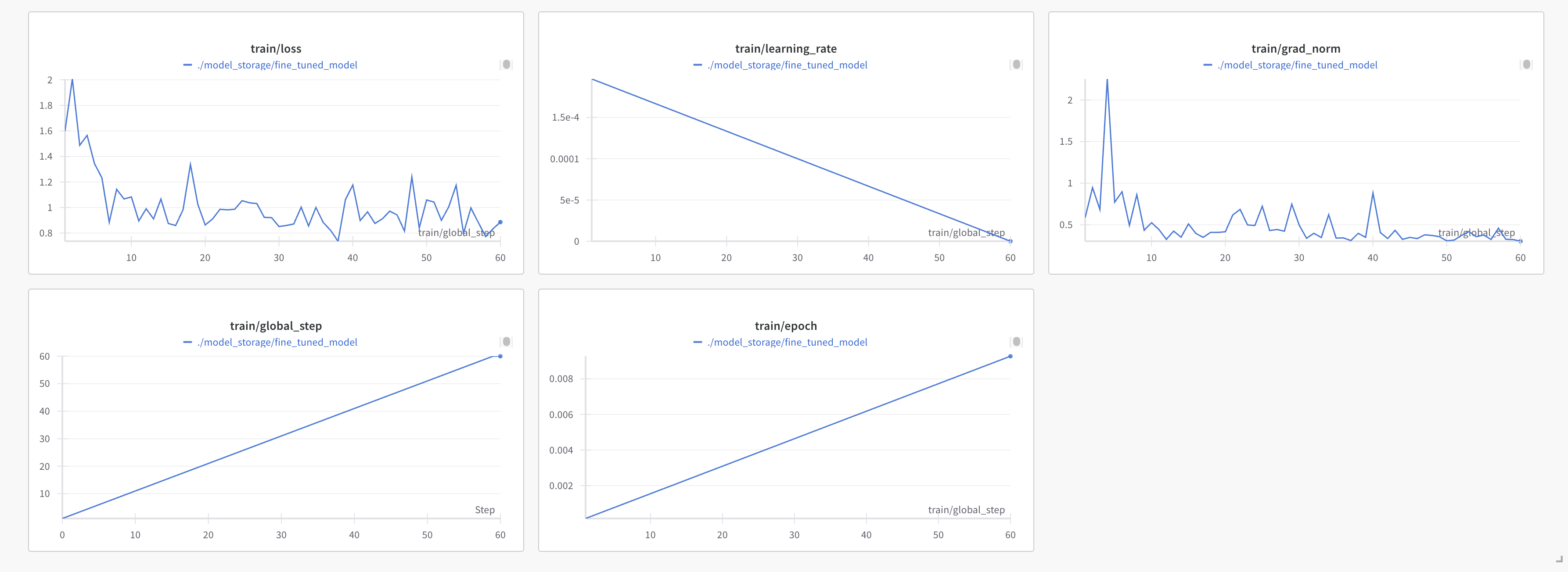 The dashboard shows a consistent decrease in training loss over time, confirming that our model was learning effectively from the Alpaca dataset.
## Evaluation
To understand the impact of fine-tuning the Meta Llama 3.1 8B model with Unsloth on the Alpaca-cleaned dataset, we evaluated both the base model and the fine-tuned model on two widely used benchmarks: **HellaSwag** (a commonsense reasoning task) and **MMLU** (Massive Multitask Language Understanding, covering a broad range of subjects). The results highlight the fine-tuned model's improvements over the base model, demonstrating the effectiveness of our fine-tuning process.
### Overall Performance
The table below summarizes the overall performance on HellaSwag and MMLU. The fine-tuned model shows modest but consistent gains across both benchmarks.
| Benchmark | Base Model | Fine-tuned Model | Improvement |
| --------------------- | ---------- | ---------------- | ----------- |
| HellaSwag (acc) | 59.09% | 60.37% | +1.28% |
| HellaSwag (acc\_norm) | 77.93% | 78.75% | +0.82% |
| MMLU (overall) | 61.42% | 62.33% | +0.91% |
* **HellaSwag**: The fine-tuned model improves accuracy (acc) by 1.28% and normalized accuracy (acc\_norm) by 0.82%, indicating better commonsense reasoning capabilities.
* **MMLU**: An overall improvement of 0.91% suggests the model has enhanced its general knowledge and reasoning across diverse topics.
### Analysis
The fine-tuned model demonstrates consistent improvements over the base model, particularly in tasks requiring logical reasoning, ethical judgment, and commonsense understanding. These gains align with the Alpaca-cleaned dataset's focus on instruction-following and coherent responses.
## Inference
### Inference Script
The inference script (`inference.py`) loads the fine-tuned model and exposes an endpoint for generating responses.
```python theme={null}
from beam import Image, endpoint, Volume, env
if env.is_remote():
from unsloth import FastLanguageModel
from unsloth.chat_templates import get_chat_template
image = (
Image(python_version="python3.11")
.add_python_packages(
[
"ninja",
"packaging",
"wheel",
"torch",
"xformers",
"trl",
"peft",
"accelerate",
"bitsandbytes",
]
)
.add_commands(
[
"pip uninstall unsloth -y",
'pip install "unsloth[colab-new] @ git+https://github.com/unslothai/unsloth.git"',
]
)
)
MAX_SEQ_LENGTH = 2048
VOLUME_PATH = "./model_storage"
@endpoint(
name="unsloth-inference",
image=image,
cpu=12,
memory="32Gi",
gpu="H100",
timeout=-1,
volumes=[Volume(name="model-storage", mount_path=VOLUME_PATH)],
)
def generate(**inputs):
prompt = inputs.pop("prompt", None)
if not prompt:
return {"error": "Please provide a prompt"}
model, tokenizer = FastLanguageModel.from_pretrained(
model_name=f"{VOLUME_PATH}/fine_tuned_model",
max_seq_length=MAX_SEQ_LENGTH,
load_in_4bit=True,
)
tokenizer = get_chat_template(
tokenizer,
chat_template="llama-3.1",
)
FastLanguageModel.for_inference(model)
messages = [
{
"role": "user",
"content": prompt,
},
]
inputs = tokenizer.apply_chat_template(
messages,
tokenize=True,
add_generation_prompt=True,
return_tensors="pt",
).to("cuda")
outputs = model.generate(
input_ids=inputs, max_new_tokens=64, use_cache=True, temperature=1.5, min_p=0.1
)
res = tokenizer.batch_decode(outputs)
return {"output": res}
```
### Deploying the Endpoint
Run this command to deploy the inference endpoint:
```bash theme={null}
beam deploy inference.py:generate
```
You'll get back a URL with the endpoint:
```bash theme={null}
=> Building image
=> Syncing files
=> Deploying
=> Deployed
=> Invocation details
curl -X POST 'https://app.beam.cloud/endpoint/unsloth-inference/v1' \
-H 'Content-Type: application/json' \
-H 'Authorization: Bearer {YOUR_AUTH_TOKEN}' \
-d '{"prompt": "Your prompt"}'
```
The dashboard shows a consistent decrease in training loss over time, confirming that our model was learning effectively from the Alpaca dataset.
## Evaluation
To understand the impact of fine-tuning the Meta Llama 3.1 8B model with Unsloth on the Alpaca-cleaned dataset, we evaluated both the base model and the fine-tuned model on two widely used benchmarks: **HellaSwag** (a commonsense reasoning task) and **MMLU** (Massive Multitask Language Understanding, covering a broad range of subjects). The results highlight the fine-tuned model's improvements over the base model, demonstrating the effectiveness of our fine-tuning process.
### Overall Performance
The table below summarizes the overall performance on HellaSwag and MMLU. The fine-tuned model shows modest but consistent gains across both benchmarks.
| Benchmark | Base Model | Fine-tuned Model | Improvement |
| --------------------- | ---------- | ---------------- | ----------- |
| HellaSwag (acc) | 59.09% | 60.37% | +1.28% |
| HellaSwag (acc\_norm) | 77.93% | 78.75% | +0.82% |
| MMLU (overall) | 61.42% | 62.33% | +0.91% |
* **HellaSwag**: The fine-tuned model improves accuracy (acc) by 1.28% and normalized accuracy (acc\_norm) by 0.82%, indicating better commonsense reasoning capabilities.
* **MMLU**: An overall improvement of 0.91% suggests the model has enhanced its general knowledge and reasoning across diverse topics.
### Analysis
The fine-tuned model demonstrates consistent improvements over the base model, particularly in tasks requiring logical reasoning, ethical judgment, and commonsense understanding. These gains align with the Alpaca-cleaned dataset's focus on instruction-following and coherent responses.
## Inference
### Inference Script
The inference script (`inference.py`) loads the fine-tuned model and exposes an endpoint for generating responses.
```python theme={null}
from beam import Image, endpoint, Volume, env
if env.is_remote():
from unsloth import FastLanguageModel
from unsloth.chat_templates import get_chat_template
image = (
Image(python_version="python3.11")
.add_python_packages(
[
"ninja",
"packaging",
"wheel",
"torch",
"xformers",
"trl",
"peft",
"accelerate",
"bitsandbytes",
]
)
.add_commands(
[
"pip uninstall unsloth -y",
'pip install "unsloth[colab-new] @ git+https://github.com/unslothai/unsloth.git"',
]
)
)
MAX_SEQ_LENGTH = 2048
VOLUME_PATH = "./model_storage"
@endpoint(
name="unsloth-inference",
image=image,
cpu=12,
memory="32Gi",
gpu="H100",
timeout=-1,
volumes=[Volume(name="model-storage", mount_path=VOLUME_PATH)],
)
def generate(**inputs):
prompt = inputs.pop("prompt", None)
if not prompt:
return {"error": "Please provide a prompt"}
model, tokenizer = FastLanguageModel.from_pretrained(
model_name=f"{VOLUME_PATH}/fine_tuned_model",
max_seq_length=MAX_SEQ_LENGTH,
load_in_4bit=True,
)
tokenizer = get_chat_template(
tokenizer,
chat_template="llama-3.1",
)
FastLanguageModel.for_inference(model)
messages = [
{
"role": "user",
"content": prompt,
},
]
inputs = tokenizer.apply_chat_template(
messages,
tokenize=True,
add_generation_prompt=True,
return_tensors="pt",
).to("cuda")
outputs = model.generate(
input_ids=inputs, max_new_tokens=64, use_cache=True, temperature=1.5, min_p=0.1
)
res = tokenizer.batch_decode(outputs)
return {"output": res}
```
### Deploying the Endpoint
Run this command to deploy the inference endpoint:
```bash theme={null}
beam deploy inference.py:generate
```
You'll get back a URL with the endpoint:
```bash theme={null}
=> Building image
=> Syncing files
=> Deploying
=> Deployed
=> Invocation details
curl -X POST 'https://app.beam.cloud/endpoint/unsloth-inference/v1' \
-H 'Content-Type: application/json' \
-H 'Authorization: Bearer {YOUR_AUTH_TOKEN}' \
-d '{"prompt": "Your prompt"}'
```