> ## Documentation Index
> Fetch the complete documentation index at: https://docs.beam.cloud/llms.txt
> Use this file to discover all available pages before exploring further.
# Serverless ComfyUI
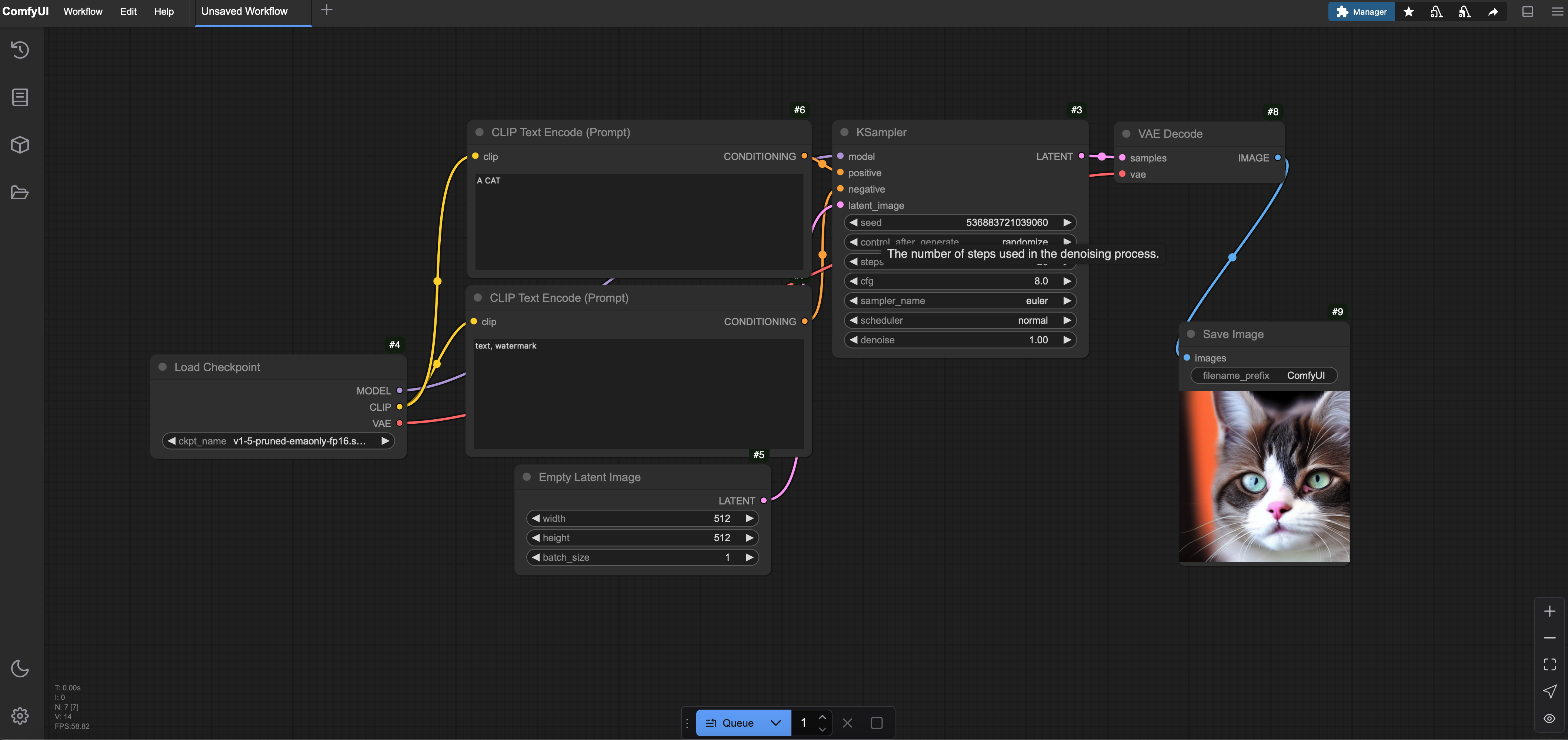
This guide shows how to deploy a ComfyUI server on Beam using [`Pod`](/v2/pod/web-service). We'll set up a server to generate images with [Flux1 Schnell](https://huggingface.co/Comfy-Org/flux1-schnell), but you can easily adapt it to use other models like Stable Diffusion v1.5.
See the code for this example on Github.
 ## Setting Up the ComfyUI Server
1. **Create the Deployment Script**
Create a file named `app.py` with the following code. This script sets up a Beam `Pod` with ComfyUI, installs dependencies, downloads the Flux1 Schnell model, and launches the server.
```python theme={null}
from beam import Image, Pod
ORG_NAME = "Comfy-Org"
REPO_NAME = "flux1-schnell"
WEIGHTS_FILE = "flux1-schnell-fp8.safetensors"
COMMIT = "f2808ab17fe9ff81dcf89ed0301cf644c281be0a"
image = (
Image()
.add_commands(["apt update && apt install git -y"])
.add_python_packages(
[
"fastapi[standard]==0.115.4",
"comfy-cli==1.3.5",
"huggingface_hub[hf_transfer]==0.26.2",
]
)
.add_commands(
[
"comfy --skip-prompt install --nvidia --version 0.3.10",
"comfy node install was-node-suite-comfyui@1.0.2",
"mkdir -p /root/comfy/ComfyUI/models/checkpoints/",
f"huggingface-cli download {ORG_NAME}/{REPO_NAME} {WEIGHTS_FILE} --cache-dir /comfy-cache",
f"ln -s /comfy-cache/models--{ORG_NAME}--{REPO_NAME}/snapshots/{COMMIT}/{WEIGHTS_FILE} /root/comfy/ComfyUI/models/checkpoints/{WEIGHTS_FILE}",
]
)
)
comfyui_server = Pod(
image=image,
ports=[8000],
cpu=12,
memory="32Gi",
gpu="H100",
entrypoint=["sh", "-c", "comfy launch -- --listen 0.0.0.0 --port 8000"],
)
res = comfyui_server.create()
print("ComfyUI hosted at:", res.url)
```
2. **Start ComfyUI**
```bash theme={null}
python app.py
```
This deploys the ComfyUI server to Beam. After deployment, you'll see a URL (e.g., `https://pod-12345.apps.beam.cloud`) where your server is hosted.
{" "}
ComfyUI takes a minute or two to start after deploying it for the first
time.
3. **Accessing the Server**
* Open the URL from your terminal in a browser to access the ComfyUI interface.
* Use the web UI to load workflows or generate images.
## Using Different Models
You can swap the Flux1 Schnell model for another, such as Stable Diffusion v1.5, by updating the model variables in `app.py`. Here’s how:
1. **Update the Model Variables**
Define the organization, repository, weights file, and commit ID for your desired model. For example, to use Stable Diffusion v1.5:
```python theme={null}
ORG_NAME = "Comfy-Org"
REPO_NAME = "stable-diffusion-v1-5-archive"
WEIGHTS_FILE = "v1-5-pruned-emaonly-fp16.safetensors"
COMMIT = "21e044065c0b2d82dafd35397a553847c70c0445"
```
2. **Apply to the Image Commands**
The rest of the script uses these variables, so no further changes are needed to the `image` section:
```python theme={null}
image = (
Image()
.add_commands(["apt update && apt install git -y"])
.add_python_packages(
[
"fastapi[standard]==0.115.4",
"comfy-cli==1.3.5",
"huggingface_hub[hf_transfer]==0.26.2",
]
)
.add_commands(
[
"comfy --skip-prompt install --nvidia --version 0.3.10",
"comfy node install was-node-suite-comfyui@1.0.2",
"mkdir -p /root/comfy/ComfyUI/models/checkpoints/",
f"huggingface-cli download {ORG_NAME}/{REPO_NAME} {WEIGHTS_FILE} --cache-dir /comfy-cache",
f"ln -s /comfy-cache/models--{ORG_NAME}--{REPO_NAME}/snapshots/{COMMIT}/{WEIGHTS_FILE} /root/comfy/ComfyUI/models/checkpoints/{WEIGHTS_FILE}",
]
)
)
```
3. **Find Model Details**
To use any other model:
* Visit [Comfy-Org Hugging Face](https://huggingface.co/Comfy-Org) and find your desired model.
* Update `ORG_NAME`, `REPO_NAME`, `WEIGHTS_FILE`, and `COMMIT` with values from the model’s repository. Check the "Files and versions" tab for the weights file and commit hash.
## Running Workflows as APIs
You can also expose ComfyUI workflows as APIs using Beam’s ASGI support. This allows you to programmatically generate images by sending requests with prompts. Below is an example of how to set this up:
1. **Create the API Script**
```python theme={null}
from beam import Image, asgi, Output
image = (
Image()
.add_commands(["apt update && apt install git -y"])
.add_python_packages(
[
"fastapi[standard]==0.115.4",
"comfy-cli",
"huggingface_hub[hf_transfer]==0.26.2",
]
)
.add_commands(
[
"yes | comfy install --nvidia --version 0.3.10",
"comfy node install was-node-suite-comfyui@1.0.2",
"mkdir -p /root/comfy/ComfyUI/models/checkpoints/",
"huggingface-cli download Comfy-Org/flux1-schnell flux1-schnell-fp8.safetensors --cache-dir /comfy-cache",
"ln -s /comfy-cache/models--Comfy-Org--flux1-schnell/snapshots/f2808ab17fe9ff81dcf89ed0301cf644c281be0a/flux1-schnell-fp8.safetensors /root/comfy/ComfyUI/models/checkpoints/flux1-schnell-fp8.safetensors",
]
)
)
def init_models():
import subprocess
cmd = "comfy launch --background"
subprocess.run(cmd, shell=True, check=True)
@asgi(
name="comfy",
image=image,
on_start=init_models,
cpu=8,
memory="32Gi",
gpu="H100",
timeout=-1,
)
def handler():
from fastapi import FastAPI, HTTPException
import subprocess
import json
from pathlib import Path
import uuid
from typing import Dict
app = FastAPI()
# This is where you specify the path to your workflow file.
# Make sure "workflow_api.json" exists in the same directory as this script.
WORKFLOW_FILE = Path(__file__).parent / "workflow_api.json"
OUTPUT_DIR = Path("/root/comfy/ComfyUI/output")
@app.post("/generate")
async def generate(item: Dict):
if not WORKFLOW_FILE.exists():
raise HTTPException(status_code=500, detail="Workflow file not found.")
workflow_data = json.loads(WORKFLOW_FILE.read_text())
workflow_data["6"]["inputs"]["text"] = item["prompt"]
request_id = uuid.uuid4().hex
workflow_data["9"]["inputs"]["filename_prefix"] = request_id
new_workflow_file = Path(f"{request_id}.json")
new_workflow_file.write_text(json.dumps(workflow_data, indent=4))
# Run inference
cmd = f"comfy run --workflow {new_workflow_file} --wait --timeout 1200 --verbose"
subprocess.run(cmd, shell=True, check=True)
image_files = list(OUTPUT_DIR.glob("*"))
# Find the latest image
latest_image = max(
(f for f in image_files if f.suffix.lower() in {".png", ".jpg", ".jpeg"}),
key=lambda f: f.stat().st_mtime,
default=None
)
if not latest_image:
raise HTTPException(status_code=404, detail="No output image found.")
output_file = Output(path=latest_image)
output_file.save()
public_url = output_file.public_url(expires=-1)
print(public_url)
return {"output_url": public_url}
return app
```
2. **Prepare a Workflow File**
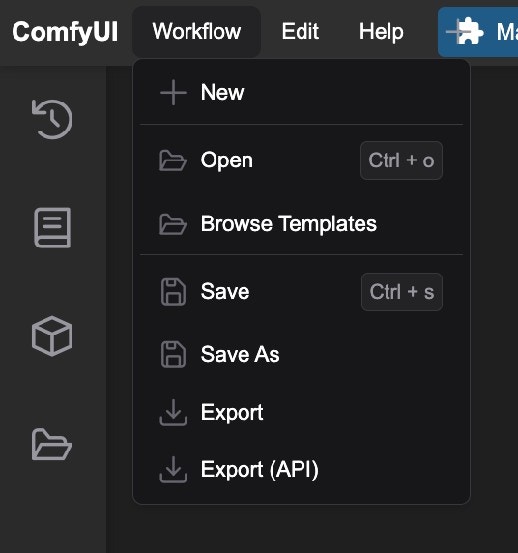
* Create a `workflow_api.json` file in the same directory as `app.py`. This file should contain your ComfyUI workflow, which you can export from the ComfyUI web interface.
{" "}
## Setting Up the ComfyUI Server
1. **Create the Deployment Script**
Create a file named `app.py` with the following code. This script sets up a Beam `Pod` with ComfyUI, installs dependencies, downloads the Flux1 Schnell model, and launches the server.
```python theme={null}
from beam import Image, Pod
ORG_NAME = "Comfy-Org"
REPO_NAME = "flux1-schnell"
WEIGHTS_FILE = "flux1-schnell-fp8.safetensors"
COMMIT = "f2808ab17fe9ff81dcf89ed0301cf644c281be0a"
image = (
Image()
.add_commands(["apt update && apt install git -y"])
.add_python_packages(
[
"fastapi[standard]==0.115.4",
"comfy-cli==1.3.5",
"huggingface_hub[hf_transfer]==0.26.2",
]
)
.add_commands(
[
"comfy --skip-prompt install --nvidia --version 0.3.10",
"comfy node install was-node-suite-comfyui@1.0.2",
"mkdir -p /root/comfy/ComfyUI/models/checkpoints/",
f"huggingface-cli download {ORG_NAME}/{REPO_NAME} {WEIGHTS_FILE} --cache-dir /comfy-cache",
f"ln -s /comfy-cache/models--{ORG_NAME}--{REPO_NAME}/snapshots/{COMMIT}/{WEIGHTS_FILE} /root/comfy/ComfyUI/models/checkpoints/{WEIGHTS_FILE}",
]
)
)
comfyui_server = Pod(
image=image,
ports=[8000],
cpu=12,
memory="32Gi",
gpu="H100",
entrypoint=["sh", "-c", "comfy launch -- --listen 0.0.0.0 --port 8000"],
)
res = comfyui_server.create()
print("ComfyUI hosted at:", res.url)
```
2. **Start ComfyUI**
```bash theme={null}
python app.py
```
This deploys the ComfyUI server to Beam. After deployment, you'll see a URL (e.g., `https://pod-12345.apps.beam.cloud`) where your server is hosted.
{" "}
ComfyUI takes a minute or two to start after deploying it for the first
time.
3. **Accessing the Server**
* Open the URL from your terminal in a browser to access the ComfyUI interface.
* Use the web UI to load workflows or generate images.
## Using Different Models
You can swap the Flux1 Schnell model for another, such as Stable Diffusion v1.5, by updating the model variables in `app.py`. Here’s how:
1. **Update the Model Variables**
Define the organization, repository, weights file, and commit ID for your desired model. For example, to use Stable Diffusion v1.5:
```python theme={null}
ORG_NAME = "Comfy-Org"
REPO_NAME = "stable-diffusion-v1-5-archive"
WEIGHTS_FILE = "v1-5-pruned-emaonly-fp16.safetensors"
COMMIT = "21e044065c0b2d82dafd35397a553847c70c0445"
```
2. **Apply to the Image Commands**
The rest of the script uses these variables, so no further changes are needed to the `image` section:
```python theme={null}
image = (
Image()
.add_commands(["apt update && apt install git -y"])
.add_python_packages(
[
"fastapi[standard]==0.115.4",
"comfy-cli==1.3.5",
"huggingface_hub[hf_transfer]==0.26.2",
]
)
.add_commands(
[
"comfy --skip-prompt install --nvidia --version 0.3.10",
"comfy node install was-node-suite-comfyui@1.0.2",
"mkdir -p /root/comfy/ComfyUI/models/checkpoints/",
f"huggingface-cli download {ORG_NAME}/{REPO_NAME} {WEIGHTS_FILE} --cache-dir /comfy-cache",
f"ln -s /comfy-cache/models--{ORG_NAME}--{REPO_NAME}/snapshots/{COMMIT}/{WEIGHTS_FILE} /root/comfy/ComfyUI/models/checkpoints/{WEIGHTS_FILE}",
]
)
)
```
3. **Find Model Details**
To use any other model:
* Visit [Comfy-Org Hugging Face](https://huggingface.co/Comfy-Org) and find your desired model.
* Update `ORG_NAME`, `REPO_NAME`, `WEIGHTS_FILE`, and `COMMIT` with values from the model’s repository. Check the "Files and versions" tab for the weights file and commit hash.
## Running Workflows as APIs
You can also expose ComfyUI workflows as APIs using Beam’s ASGI support. This allows you to programmatically generate images by sending requests with prompts. Below is an example of how to set this up:
1. **Create the API Script**
```python theme={null}
from beam import Image, asgi, Output
image = (
Image()
.add_commands(["apt update && apt install git -y"])
.add_python_packages(
[
"fastapi[standard]==0.115.4",
"comfy-cli",
"huggingface_hub[hf_transfer]==0.26.2",
]
)
.add_commands(
[
"yes | comfy install --nvidia --version 0.3.10",
"comfy node install was-node-suite-comfyui@1.0.2",
"mkdir -p /root/comfy/ComfyUI/models/checkpoints/",
"huggingface-cli download Comfy-Org/flux1-schnell flux1-schnell-fp8.safetensors --cache-dir /comfy-cache",
"ln -s /comfy-cache/models--Comfy-Org--flux1-schnell/snapshots/f2808ab17fe9ff81dcf89ed0301cf644c281be0a/flux1-schnell-fp8.safetensors /root/comfy/ComfyUI/models/checkpoints/flux1-schnell-fp8.safetensors",
]
)
)
def init_models():
import subprocess
cmd = "comfy launch --background"
subprocess.run(cmd, shell=True, check=True)
@asgi(
name="comfy",
image=image,
on_start=init_models,
cpu=8,
memory="32Gi",
gpu="H100",
timeout=-1,
)
def handler():
from fastapi import FastAPI, HTTPException
import subprocess
import json
from pathlib import Path
import uuid
from typing import Dict
app = FastAPI()
# This is where you specify the path to your workflow file.
# Make sure "workflow_api.json" exists in the same directory as this script.
WORKFLOW_FILE = Path(__file__).parent / "workflow_api.json"
OUTPUT_DIR = Path("/root/comfy/ComfyUI/output")
@app.post("/generate")
async def generate(item: Dict):
if not WORKFLOW_FILE.exists():
raise HTTPException(status_code=500, detail="Workflow file not found.")
workflow_data = json.loads(WORKFLOW_FILE.read_text())
workflow_data["6"]["inputs"]["text"] = item["prompt"]
request_id = uuid.uuid4().hex
workflow_data["9"]["inputs"]["filename_prefix"] = request_id
new_workflow_file = Path(f"{request_id}.json")
new_workflow_file.write_text(json.dumps(workflow_data, indent=4))
# Run inference
cmd = f"comfy run --workflow {new_workflow_file} --wait --timeout 1200 --verbose"
subprocess.run(cmd, shell=True, check=True)
image_files = list(OUTPUT_DIR.glob("*"))
# Find the latest image
latest_image = max(
(f for f in image_files if f.suffix.lower() in {".png", ".jpg", ".jpeg"}),
key=lambda f: f.stat().st_mtime,
default=None
)
if not latest_image:
raise HTTPException(status_code=404, detail="No output image found.")
output_file = Output(path=latest_image)
output_file.save()
public_url = output_file.public_url(expires=-1)
print(public_url)
return {"output_url": public_url}
return app
```
2. **Prepare a Workflow File**
* Create a `workflow_api.json` file in the same directory as `app.py`. This file should contain your ComfyUI workflow, which you can export from the ComfyUI web interface.
{" "}
 * You can also store your `workflow_api.json` file in your Volume and use it like `WORKFLOW_FILE = Path("/your_volume/workflow_api.json")`
3. **Deploy the API**
```bash theme={null}
beam deploy api.py:handler
```
4. **Use the API**
Send a POST request to the `/generate` endpoint with a JSON payload containing a `prompt`:
```bash theme={null}
curl -X POST https://12345.apps.beam.cloud/generate \
-H 'Content-Type: application/json' \
-H 'Authorization: Bearer YOUR_BEAM_API' \
-d '{"prompt": "A cat image"}'
```
The response will include a public URL to the generated image:
```json theme={null}
{
"output_url": "https://app.beam.cloud/output/id/9a003889-8345-4969-bdf8-2808eebc1c4b"
}
```
* You can also store your `workflow_api.json` file in your Volume and use it like `WORKFLOW_FILE = Path("/your_volume/workflow_api.json")`
3. **Deploy the API**
```bash theme={null}
beam deploy api.py:handler
```
4. **Use the API**
Send a POST request to the `/generate` endpoint with a JSON payload containing a `prompt`:
```bash theme={null}
curl -X POST https://12345.apps.beam.cloud/generate \
-H 'Content-Type: application/json' \
-H 'Authorization: Bearer YOUR_BEAM_API' \
-d '{"prompt": "A cat image"}'
```
The response will include a public URL to the generated image:
```json theme={null}
{
"output_url": "https://app.beam.cloud/output/id/9a003889-8345-4969-bdf8-2808eebc1c4b"
}
```