> ## Documentation Index
> Fetch the complete documentation index at: https://docs.beam.cloud/llms.txt
> Use this file to discover all available pages before exploring further.
# Example: Research Assistant
Beam's agent framework is designed for concurrency and synchronization. In this example, we'll show how you can deploy an app that scrapes online product reviews.
You can follow along with the tutorial in the video below.
## Why Beam?
Beam's Petri Net framework is ideal for workflows that require concurrency and scalability. This app uses Beam to:
* **Retrieve Google Shopping URLs** for a product name you provide to the bot.
* **Scrape review pages** for those products.
* **Summarize reviews** into a report.
## Pre-requisites
You'll need three API keys to run the example below:
* [Firecrawl API key](https://docs.firecrawl.dev/introduction) (free), used for scraping product pages
* [SerpApi API key](https://serpapi.com/) (free for 100 searches a month), used to retrieve Google Shopping URLs
* [OpenAI API Key](https://platform.openai.com/docs/quickstart)
Set up your environment variables by adding these keys to a `.env` file in your project directory.
```
OPEN_AI_API_KEY=your_openai_api_key
SERPAPI_API_KEY=your_serpapi_api_key
FIRECRAWL_API_KEY=your_firecrawl_api_key
```
## Setup
### Defining Locations
Locations represent the states of data flowing through the network. In this app, we'll use three states:
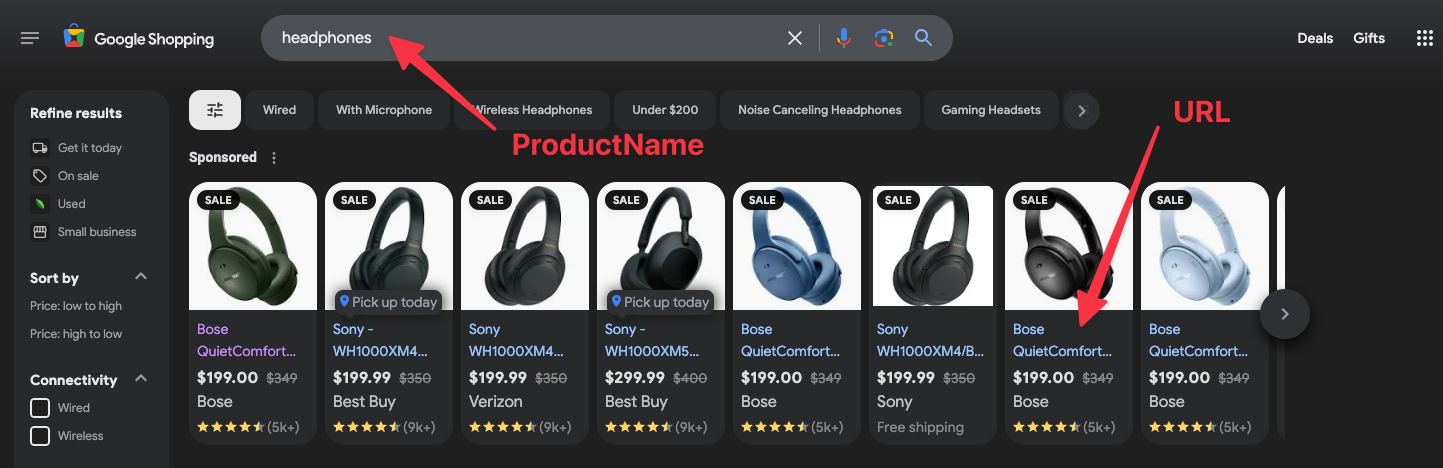
* **ProductName**: The product to search for (i.e. "headphones")
* **URL**: URLs of product pages retrieved from Google Shopping
* **ReviewPage**: Online product pages with customer reviews
Define these locations in your code:
```python theme={null}
from pydantic import BaseModel
class ProductName(BaseModel):
product_name: str
class URL(BaseModel):
url: str
class ReviewPage(BaseModel):
review_page: str
```
### Create the Bot
Let's setup the bot, which is what manages the workflow. Add your API keys and define the locations (states) it will manage.
```python theme={null}
from beam import Bot, BotLocation
bot = Bot(
model="gpt-4o",
api_key=OPEN_AI_API_KEY,
locations=[
BotLocation(marker=ProductName),
BotLocation(marker=URL, expose=False),
BotLocation(marker=ReviewPage, expose=False),
],
description="This bot will take a product category as input, search for reviews, and summarize them.",
)
```
## Adding Transitions
Transitions are events or actions in your bot, triggered by changes to the locations (state).
### Retrieve Product URLs
The first transition takes a product category (e.g., "headphones") and uses SerpAPI to retrieve Google Shopping URLs for the product.
```python theme={null}
from beam import Image
from serpapi import GoogleSearch
@bot.transition(
inputs={ProductName: 1},
outputs=[URL],
description="Retrieve Google Shopping results for a product.",
cpu=1,
memory=128,
image=Image(python_packages=["serpapi", "python-dotenv"]),
)
def get_product_urls(context, inputs):
product_name = inputs[ProductName][0].product_name
params = {
"engine": "google_shopping",
"q": product_name,
"api_key": SERPAPI_API_KEY,
}
search = GoogleSearch(params)
results = search.get_dict()
urls = results["shopping_results"][:3]
return {URL: [URL(url=url["product_link"]) for url in urls]}
```
### Scrape Review Pages
The second transition scrapes review pages from each product URL using Firecrawl.
```python theme={null}
from firecrawl import FirecrawlApp
import json
@bot.transition(
inputs={URL: 1},
outputs=[ReviewPage],
description="Scrape review pages for product URLs.",
cpu=1,
memory=128,
image=Image(python_packages=["firecrawl-py", "python-dotenv"]),
expose=False,
)
def scrape_reviews(context, inputs):
url = inputs[URL][0].url
app = FirecrawlApp(api_key=FIRECRAWL_API_KEY)
scrape_result = app.scrape_url(url, params={"formats": ["markdown"]})
return {ReviewPage: [ReviewPage(review_page=json.dumps(scrape_result))]}
```
### Summarize Reviews
The final transition summarizes reviews from all the scraped pages into a markdown file.
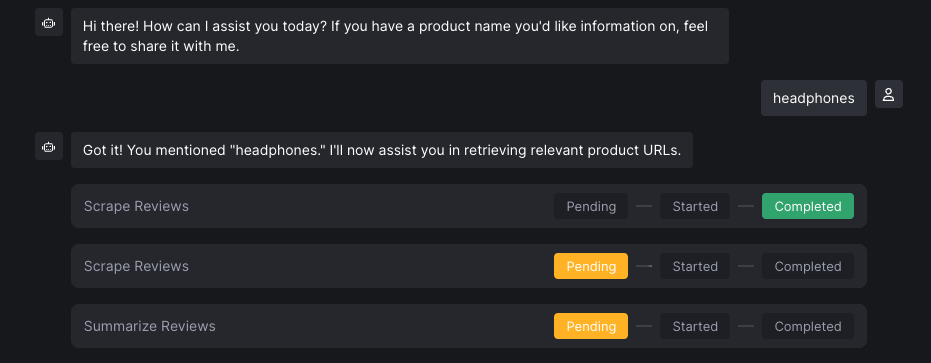
Pay close attention to the `inputs` field below. **This transition will not begin running until 3 `ReviewPage` markers have been created from the previous transition.**
```python {2} theme={null}
@bot.transition(
inputs={ReviewPage: 3},
outputs=[],
description="Summarize product reviews.",
cpu=1,
memory=128,
image=Image(python_packages=["python-dotenv"]),
expose=False,
)
def summarize_reviews(context, inputs):
all_review_pages = "\n".join([input.review_page for input in inputs[ReviewPage]])
prompt = f"""
The following pages contain markdown reviews for products.
Summarize the key takeaways, including 1-3 direct quotes from reviewers.
Ensure the product name and URL are included:
{all_review_pages}
"""
event = context.prompt(msg=prompt, timeout_seconds=30)
summary = event.value
file_path = "/tmp/product-reviews.md"
with open(file_path, "w") as f:
f.write(summary)
context.say("Product reviews summarized successfully!")
if context.confirm(description="Do you want a sharable link to the summary?"):
context.send_file(path=file_path, description="Product Review Summary")
```
Once deployed, you'll be able to see the tasks in the dashboard, with the transition waiting until all `ReviewPage` markers have been emitted.
## Deploying the Bot
```sh theme={null}
$ beam deploy app.py:bot --name product-review-bot
```
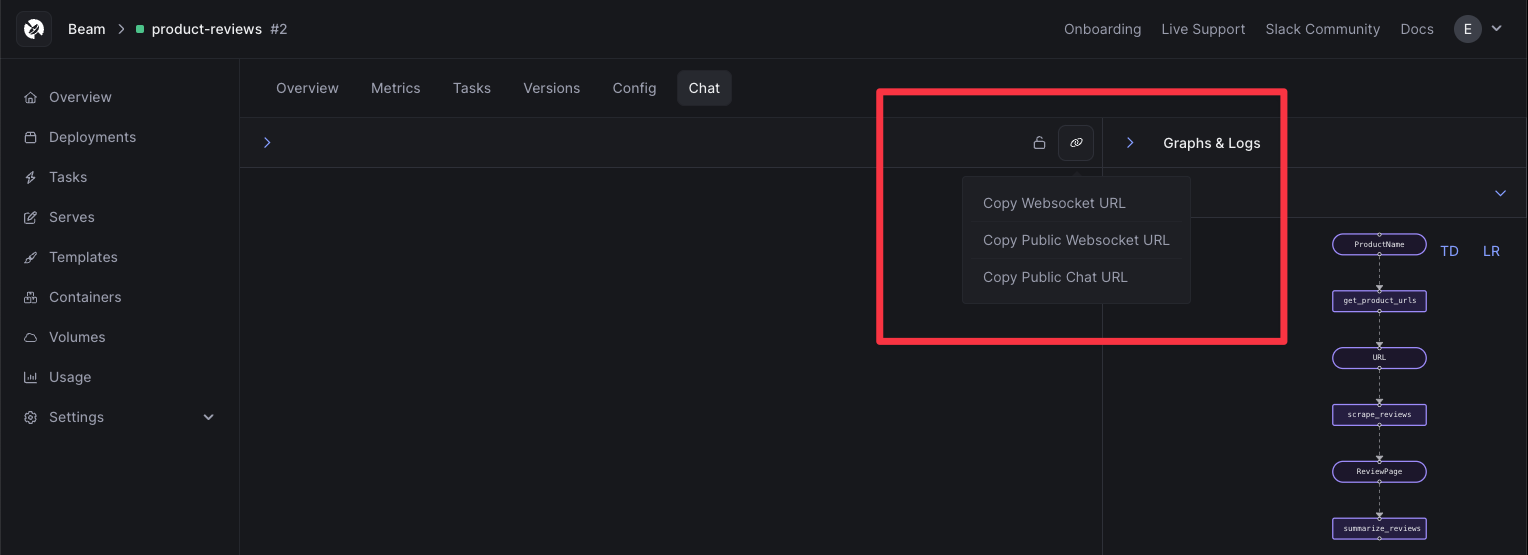
Deploying the bot gives you access to a dashboard, where you can interact with the bot using a Chat UI.
## What's next?
With the bot deployed, there are a few things you can try:
### Create a Public Chat Page
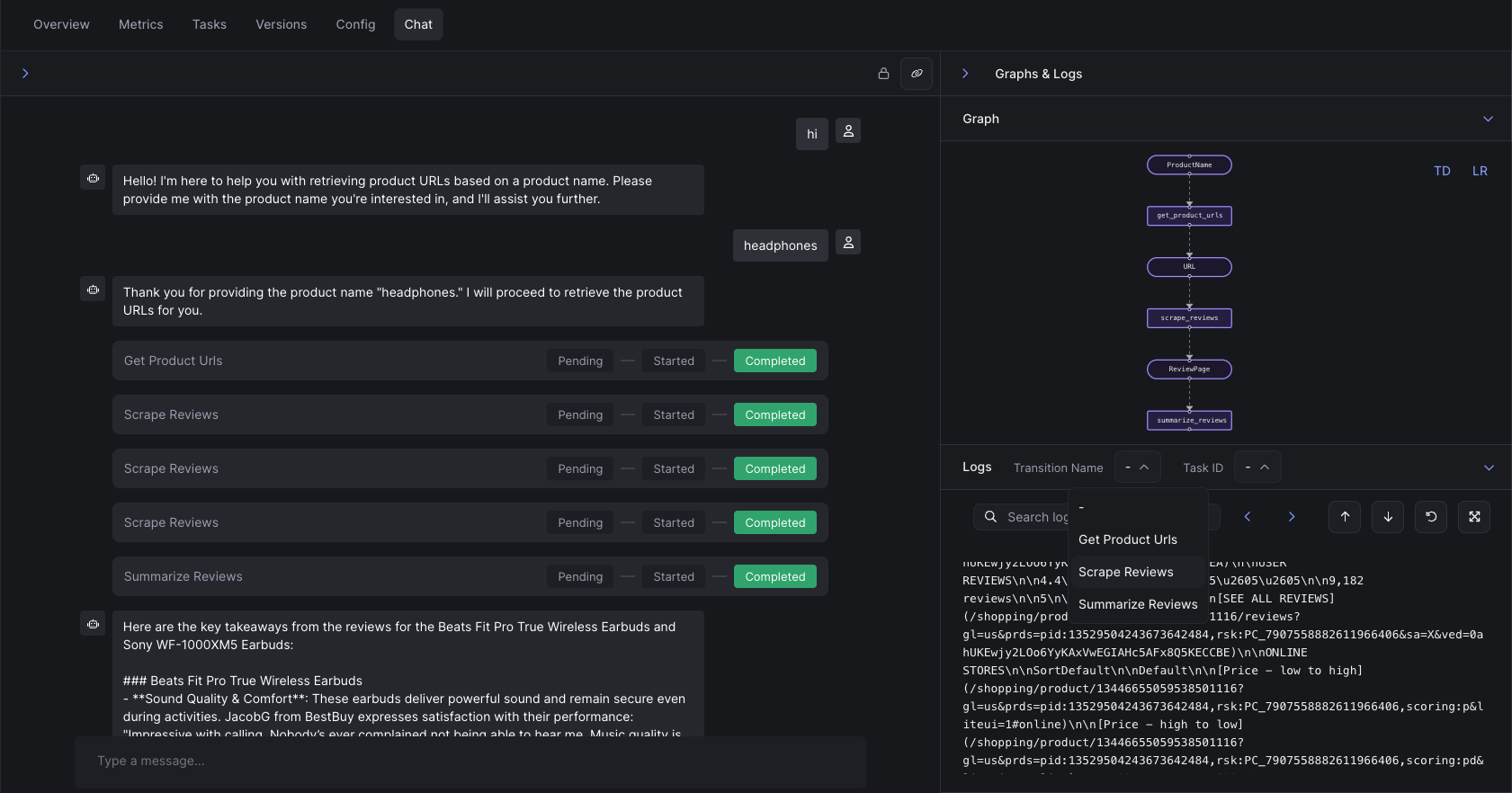
You can create a public, sharable Chat Page for your bot by adding an `authorized=False` argument to the `bot`:
```python {6} theme={null}
from beam import Bot, BotLocation
bot = Bot(
model="gpt-4o",
api_key=OPEN_AI_API_KEY,
authorized=False,
locations=[
BotLocation(marker=ProductName),
BotLocation(marker=URL, expose=False),
BotLocation(marker=ReviewPage, expose=False),
],
description="This bot will take a product category as input, search for reviews, and summarize them.",
)
```
When deployed, this gives you a sharable Chat UI. You can retrieve the URL to the Chat UI by clicking next to the "lock" icon.
Here's what the Chat UI looks like:
### Add Interactivity
We provide a number of helper commands using a class called `context`.
Context variables can be used for prompting the user for input, creating blocking requests to the bot, and sending message to the user.
***Available Commands***
| Method | Description |
| --------------------- | ----------------------------------------------------------------------------------------------------------------------------------------------------------------------------- |
| `context.confirm()` | Pause a transition until a user says yes or no. |
| `context.prompt()` | Send a blocking or non-blocking request to the model (e.g., "summarize these reviews"). You can pass an optional `wait_for_response=False` boolean to make this non-blocking. |
| `context.remember()` | Add an arbitrary JSON-serializable object to the conversation memory. |
| `context.say()` | Output text to the user's chat window. |
| `context.send_file()` | Send a file to the user from a transition. |
| `context.get_file()` | Retrieve a file from the user during a transition. |
## View The Code
You can see the full code for this example below.
```python theme={null}
from beam import Bot, BotContext, BotLocation, Image
from pydantic import BaseModel
from dotenv import load_dotenv
import os
load_dotenv()
OPEN_AI_API_KEY = os.getenv("OPEN_AI_API_KEY")
SERPAPI_API_KEY = os.getenv("SERPAPI_API_KEY")
FIRECRAWL_API_KEY = os.getenv("FIRECRAWL_API_KEY")
NUMBER_OF_PRODUCT_REVIEWS_TO_SUMMARIZE = 3
# Define Locations (States)
class ProductName(BaseModel):
product_name: str
class URL(BaseModel):
url: str
class ReviewPage(BaseModel):
review_page: str
# Create the Bot
bot = Bot(
model="gpt-4o",
api_key=OPEN_AI_API_KEY,
locations=[
BotLocation(marker=ProductName),
BotLocation(marker=URL, expose=False),
BotLocation(marker=ReviewPage, expose=False),
],
description="This bot will take a product category as input (i.e. 'headphones') and search Google shopping for those products, lookup reviews for each of them, and then summarize the reviews of all products in a summary.",
)
# Transition 1: Retrieve 3 Google shopping URLs for each product
@bot.transition(
inputs={ProductName: 1},
outputs=[URL],
description="Takes a product name and retrieves 5 Google shopping results",
cpu=1,
memory=128,
image=Image(python_packages=["serpapi", "google-search-results", "python-dotenv"]),
)
def get_product_urls(context: BotContext, inputs):
product_name = inputs[ProductName][0].product_name
from serpapi import GoogleSearch
params = {
"engine": "google_shopping",
"q": product_name,
"api_key": SERPAPI_API_KEY,
}
search = GoogleSearch(params)
results = search.get_dict()
urls = results["shopping_results"][:NUMBER_OF_PRODUCT_REVIEWS_TO_SUMMARIZE]
# Return a product url
return {URL: [URL(url=url["product_link"]) for url in urls]}
# Transition 2: Scrape review page
@bot.transition(
inputs={URL: 1},
outputs=[ReviewPage],
description="Scrapes the review page for each URL provided.",
cpu=1,
memory=128,
image=Image(python_packages=["firecrawl-py", "python-dotenv"]),
expose=False,
)
def scrape_reviews(context: BotContext, inputs):
url = inputs[URL][0].url
import json
from firecrawl import FirecrawlApp
app = FirecrawlApp(api_key=FIRECRAWL_API_KEY)
# Scrape reviews from the product page
scrape_result = app.scrape_url(url, params={"formats": ["markdown"]})
print(scrape_result)
return {ReviewPage: [ReviewPage(review_page=json.dumps(scrape_result))]}
# Transition 3: Summarize the product reviews
@bot.transition(
inputs={ReviewPage: NUMBER_OF_PRODUCT_REVIEWS_TO_SUMMARIZE},
outputs=[],
description="Summarizes the reviews.",
cpu=1,
memory=128,
image=Image().add_python_packages(["python-dotenv"]),
expose=False,
)
def summarize_reviews(context: BotContext, inputs):
try:
all_review_pages = "\n".join(
[input.review_page for input in inputs[ReviewPage]]
)
print(all_review_pages)
prompt = f"""
The following page contains markdown with a review for a product.
Please highlight the key takeaways from all the reviews,
and include 1-3 direct quotes from reviewers to support your points.
In each quote, make sure to cite the name of the reviewer (if available).
Make sure to include the name of the product, and a URL to buy it, in your response:
{all_review_pages}
"""
event = context.prompt(
msg=prompt,
timeout_seconds=30,
)
context.say("I've summarized product reviews like so: " + event.value)
file_path = "/tmp/product-reviews.md"
with open(file_path, "w") as f:
f.write(event.value)
if context.confirm(description="Do you want a sharable link to the summary?"):
context.send_file(path=file_path, description="Summary of product reviews")
except AttributeError:
context.say("Review not found.")
```
 ```python theme={null}
from beam import Image
from serpapi import GoogleSearch
@bot.transition(
inputs={ProductName: 1},
outputs=[URL],
description="Retrieve Google Shopping results for a product.",
cpu=1,
memory=128,
image=Image(python_packages=["serpapi", "python-dotenv"]),
)
def get_product_urls(context, inputs):
product_name = inputs[ProductName][0].product_name
params = {
"engine": "google_shopping",
"q": product_name,
"api_key": SERPAPI_API_KEY,
}
search = GoogleSearch(params)
results = search.get_dict()
urls = results["shopping_results"][:3]
return {URL: [URL(url=url["product_link"]) for url in urls]}
```
### Scrape Review Pages
The second transition scrapes review pages from each product URL using Firecrawl.
```python theme={null}
from firecrawl import FirecrawlApp
import json
@bot.transition(
inputs={URL: 1},
outputs=[ReviewPage],
description="Scrape review pages for product URLs.",
cpu=1,
memory=128,
image=Image(python_packages=["firecrawl-py", "python-dotenv"]),
expose=False,
)
def scrape_reviews(context, inputs):
url = inputs[URL][0].url
app = FirecrawlApp(api_key=FIRECRAWL_API_KEY)
scrape_result = app.scrape_url(url, params={"formats": ["markdown"]})
return {ReviewPage: [ReviewPage(review_page=json.dumps(scrape_result))]}
```
### Summarize Reviews
The final transition summarizes reviews from all the scraped pages into a markdown file.
Pay close attention to the `inputs` field below. **This transition will not begin running until 3 `ReviewPage` markers have been created from the previous transition.**
```python {2} theme={null}
@bot.transition(
inputs={ReviewPage: 3},
outputs=[],
description="Summarize product reviews.",
cpu=1,
memory=128,
image=Image(python_packages=["python-dotenv"]),
expose=False,
)
def summarize_reviews(context, inputs):
all_review_pages = "\n".join([input.review_page for input in inputs[ReviewPage]])
prompt = f"""
The following pages contain markdown reviews for products.
Summarize the key takeaways, including 1-3 direct quotes from reviewers.
Ensure the product name and URL are included:
{all_review_pages}
"""
event = context.prompt(msg=prompt, timeout_seconds=30)
summary = event.value
file_path = "/tmp/product-reviews.md"
with open(file_path, "w") as f:
f.write(summary)
context.say("Product reviews summarized successfully!")
if context.confirm(description="Do you want a sharable link to the summary?"):
context.send_file(path=file_path, description="Product Review Summary")
```
Once deployed, you'll be able to see the tasks in the dashboard, with the transition waiting until all `ReviewPage` markers have been emitted.
```python theme={null}
from beam import Image
from serpapi import GoogleSearch
@bot.transition(
inputs={ProductName: 1},
outputs=[URL],
description="Retrieve Google Shopping results for a product.",
cpu=1,
memory=128,
image=Image(python_packages=["serpapi", "python-dotenv"]),
)
def get_product_urls(context, inputs):
product_name = inputs[ProductName][0].product_name
params = {
"engine": "google_shopping",
"q": product_name,
"api_key": SERPAPI_API_KEY,
}
search = GoogleSearch(params)
results = search.get_dict()
urls = results["shopping_results"][:3]
return {URL: [URL(url=url["product_link"]) for url in urls]}
```
### Scrape Review Pages
The second transition scrapes review pages from each product URL using Firecrawl.
```python theme={null}
from firecrawl import FirecrawlApp
import json
@bot.transition(
inputs={URL: 1},
outputs=[ReviewPage],
description="Scrape review pages for product URLs.",
cpu=1,
memory=128,
image=Image(python_packages=["firecrawl-py", "python-dotenv"]),
expose=False,
)
def scrape_reviews(context, inputs):
url = inputs[URL][0].url
app = FirecrawlApp(api_key=FIRECRAWL_API_KEY)
scrape_result = app.scrape_url(url, params={"formats": ["markdown"]})
return {ReviewPage: [ReviewPage(review_page=json.dumps(scrape_result))]}
```
### Summarize Reviews
The final transition summarizes reviews from all the scraped pages into a markdown file.
Pay close attention to the `inputs` field below. **This transition will not begin running until 3 `ReviewPage` markers have been created from the previous transition.**
```python {2} theme={null}
@bot.transition(
inputs={ReviewPage: 3},
outputs=[],
description="Summarize product reviews.",
cpu=1,
memory=128,
image=Image(python_packages=["python-dotenv"]),
expose=False,
)
def summarize_reviews(context, inputs):
all_review_pages = "\n".join([input.review_page for input in inputs[ReviewPage]])
prompt = f"""
The following pages contain markdown reviews for products.
Summarize the key takeaways, including 1-3 direct quotes from reviewers.
Ensure the product name and URL are included:
{all_review_pages}
"""
event = context.prompt(msg=prompt, timeout_seconds=30)
summary = event.value
file_path = "/tmp/product-reviews.md"
with open(file_path, "w") as f:
f.write(summary)
context.say("Product reviews summarized successfully!")
if context.confirm(description="Do you want a sharable link to the summary?"):
context.send_file(path=file_path, description="Product Review Summary")
```
Once deployed, you'll be able to see the tasks in the dashboard, with the transition waiting until all `ReviewPage` markers have been emitted.
 ## Deploying the Bot
```sh theme={null}
$ beam deploy app.py:bot --name product-review-bot
```
Deploying the bot gives you access to a dashboard, where you can interact with the bot using a Chat UI.
## Deploying the Bot
```sh theme={null}
$ beam deploy app.py:bot --name product-review-bot
```
Deploying the bot gives you access to a dashboard, where you can interact with the bot using a Chat UI.
 ## What's next?
With the bot deployed, there are a few things you can try:
### Create a Public Chat Page
You can create a public, sharable Chat Page for your bot by adding an `authorized=False` argument to the `bot`:
```python {6} theme={null}
from beam import Bot, BotLocation
bot = Bot(
model="gpt-4o",
api_key=OPEN_AI_API_KEY,
authorized=False,
locations=[
BotLocation(marker=ProductName),
BotLocation(marker=URL, expose=False),
BotLocation(marker=ReviewPage, expose=False),
],
description="This bot will take a product category as input, search for reviews, and summarize them.",
)
```
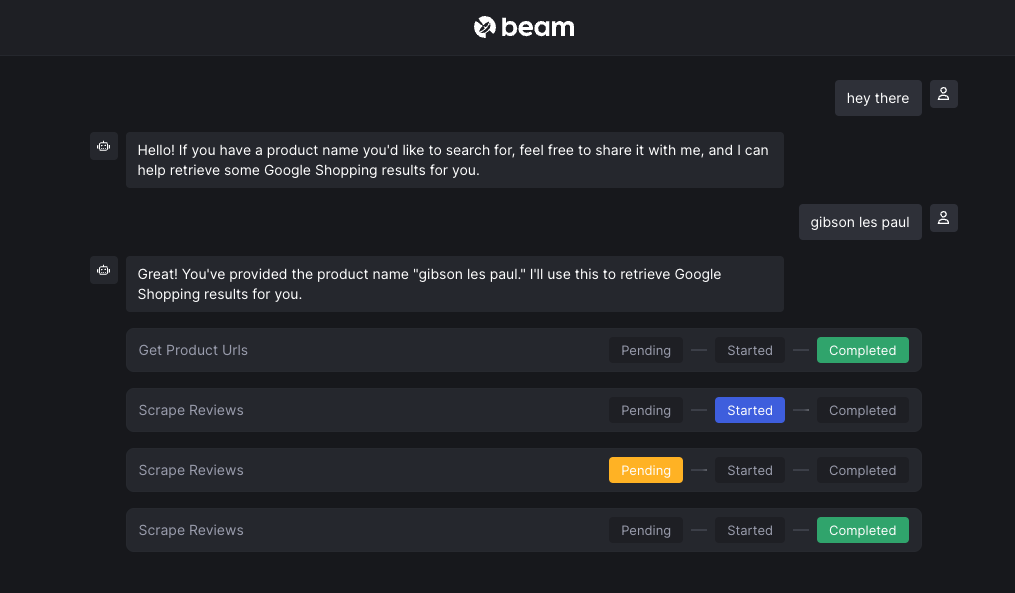
When deployed, this gives you a sharable Chat UI. You can retrieve the URL to the Chat UI by clicking next to the "lock" icon.
## What's next?
With the bot deployed, there are a few things you can try:
### Create a Public Chat Page
You can create a public, sharable Chat Page for your bot by adding an `authorized=False` argument to the `bot`:
```python {6} theme={null}
from beam import Bot, BotLocation
bot = Bot(
model="gpt-4o",
api_key=OPEN_AI_API_KEY,
authorized=False,
locations=[
BotLocation(marker=ProductName),
BotLocation(marker=URL, expose=False),
BotLocation(marker=ReviewPage, expose=False),
],
description="This bot will take a product category as input, search for reviews, and summarize them.",
)
```
When deployed, this gives you a sharable Chat UI. You can retrieve the URL to the Chat UI by clicking next to the "lock" icon.
 Here's what the Chat UI looks like:
 ### Add Interactivity
We provide a number of helper commands using a class called `context`.
Context variables can be used for prompting the user for input, creating blocking requests to the bot, and sending message to the user.
***Available Commands***
| Method | Description |
| --------------------- | ----------------------------------------------------------------------------------------------------------------------------------------------------------------------------- |
| `context.confirm()` | Pause a transition until a user says yes or no. |
| `context.prompt()` | Send a blocking or non-blocking request to the model (e.g., "summarize these reviews"). You can pass an optional `wait_for_response=False` boolean to make this non-blocking. |
| `context.remember()` | Add an arbitrary JSON-serializable object to the conversation memory. |
| `context.say()` | Output text to the user's chat window. |
| `context.send_file()` | Send a file to the user from a transition. |
| `context.get_file()` | Retrieve a file from the user during a transition. |
## View The Code
You can see the full code for this example below.
### Add Interactivity
We provide a number of helper commands using a class called `context`.
Context variables can be used for prompting the user for input, creating blocking requests to the bot, and sending message to the user.
***Available Commands***
| Method | Description |
| --------------------- | ----------------------------------------------------------------------------------------------------------------------------------------------------------------------------- |
| `context.confirm()` | Pause a transition until a user says yes or no. |
| `context.prompt()` | Send a blocking or non-blocking request to the model (e.g., "summarize these reviews"). You can pass an optional `wait_for_response=False` boolean to make this non-blocking. |
| `context.remember()` | Add an arbitrary JSON-serializable object to the conversation memory. |
| `context.say()` | Output text to the user's chat window. |
| `context.send_file()` | Send a file to the user from a transition. |
| `context.get_file()` | Retrieve a file from the user during a transition. |
## View The Code
You can see the full code for this example below.