> ## Documentation Index
> Fetch the complete documentation index at: https://docs.beam.cloud/llms.txt
> Use this file to discover all available pages before exploring further.
# Stable Diffusion API
> Building an API to generate images with stable diffusion.
### Introduction
Beam is a new way of quickly prototyping AI projects. In this example, we'll show how to deploy a serverless API endpoint that generates images with stable diffusion.
### Setting up the environment
First, we'll setup the environment to run Stable Diffusion.
We're going to define a few things:
* [`App`](/v2/reference/py-sdk) with a unique name
* [`Runtime`](/v2/reference/py-sdk) with CPU and memory requirements, and an `A10G` GPU
* [`Image`](/v2/reference/py-sdk#image) with Python packages required to run stable diffusion
* [`Volume`](/v2/reference/py-sdk#volume) to mount a storage volume to cache the model weights
```python theme={null}
from beam import App, Runtime, Image, Volume
app = App(
name="stable-diffusion-app",
runtime=Runtime(
cpu=2,
memory="16Gi",
gpu="A10G",
image=Image(
python_version="python3.8",
python_packages=[
"diffusers[torch]>=0.10",
"transformers",
"torch",
"pillow",
"accelerate",
"safetensors",
"xformers",
],
),
),
volumes=[Volume(name="models", path="./models")],
)
```
### Inference function
You'll write a simple function that takes a prompt passed from the user and returns an image generated using Stable Diffusion.
You need an access token from Huggingface to run this example. You can sign up
for Huggingface and access your token on [the settings
page](https://huggingface.co/settings/tokens), and store it in the [Beam
Secrets Manager](/v2/environment/secrets).
## Saving image outputs
Notice the `image.save()` method below. We're going to save our generated images to an `Output` file, by passing an `outputs` argument to our function:
```python theme={null}
@app.task_queue(
# File to store image outputs
outputs=[Output(path="output.png")]
)
```
Here's the full inference function:
```python app.py theme={null}
from beam import App, Runtime, Image, Output, Volume
import os
import torch
from diffusers import StableDiffusionPipeline
from PIL import Image
cache_path = "./models"
model_id = "runwayml/stable-diffusion-v1-5"
# The environment your code will run on
app = App(
name="stable-diffusion-app",
runtime=Runtime(
cpu=2,
memory="16Gi",
gpu="A10G",
image=Image(
python_version="python3.8",
python_packages=[
"diffusers[torch]>=0.10",
"transformers",
"torch",
"pillow",
"accelerate",
"safetensors",
"xformers",
],
),
),
volumes=[Volume(name="models", path="./models")],
)
@app.task_queue(
# File to store image outputs
outputs=[Output(path="output.png")]
)
def generate_image(**inputs):
prompt = inputs["prompt"]
torch.backends.cuda.matmul.allow_tf32 = True
pipe = StableDiffusionPipeline.from_pretrained(
model_id,
revision="fp16",
torch_dtype=torch.float16,
cache_dir=cache_path,
# Add your own auth token from Huggingface
use_auth_token=os.environ["HUGGINGFACE_API_KEY"],
).to("cuda")
with torch.inference_mode():
with torch.autocast("cuda"):
image = pipe(prompt, num_inference_steps=50, guidance_scale=7.5).images[0]
print(f"Saved Image: {image}")
image.save("output.png")
if __name__ == "__main__":
prompt = "a renaissance style photo of elon musk"
generate_image(prompt=prompt)
```
## Adding callbacks
If you supply a `callback_url` argument, Beam will make a POST request to your server whenever a task completes:
```python app.py theme={null}
@app.task_queue(
# File to store image outputs
outputs=[Output(path="output.png")],
callback_url="http://my-server.io",
keep_warm_seconds=300,
)
```
## Deployment
In your teriminal, run:
```sh theme={null}
beam deploy app.py
```
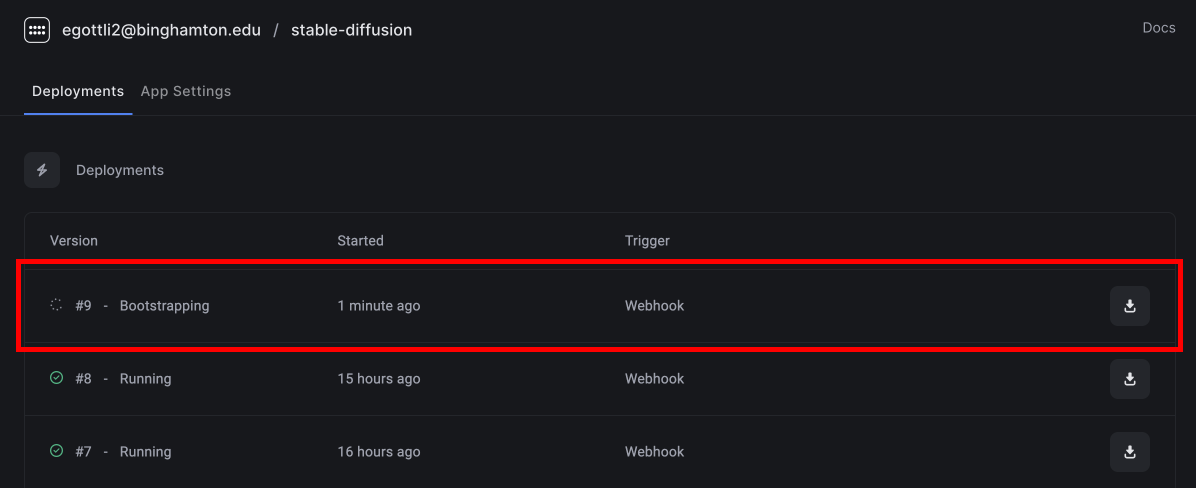
You'll see the deployment appear in the dashboard.
 ## Calling the API
In the dashboard, click **Call API** to view the API URL.
## Calling the API
In the dashboard, click **Call API** to view the API URL.
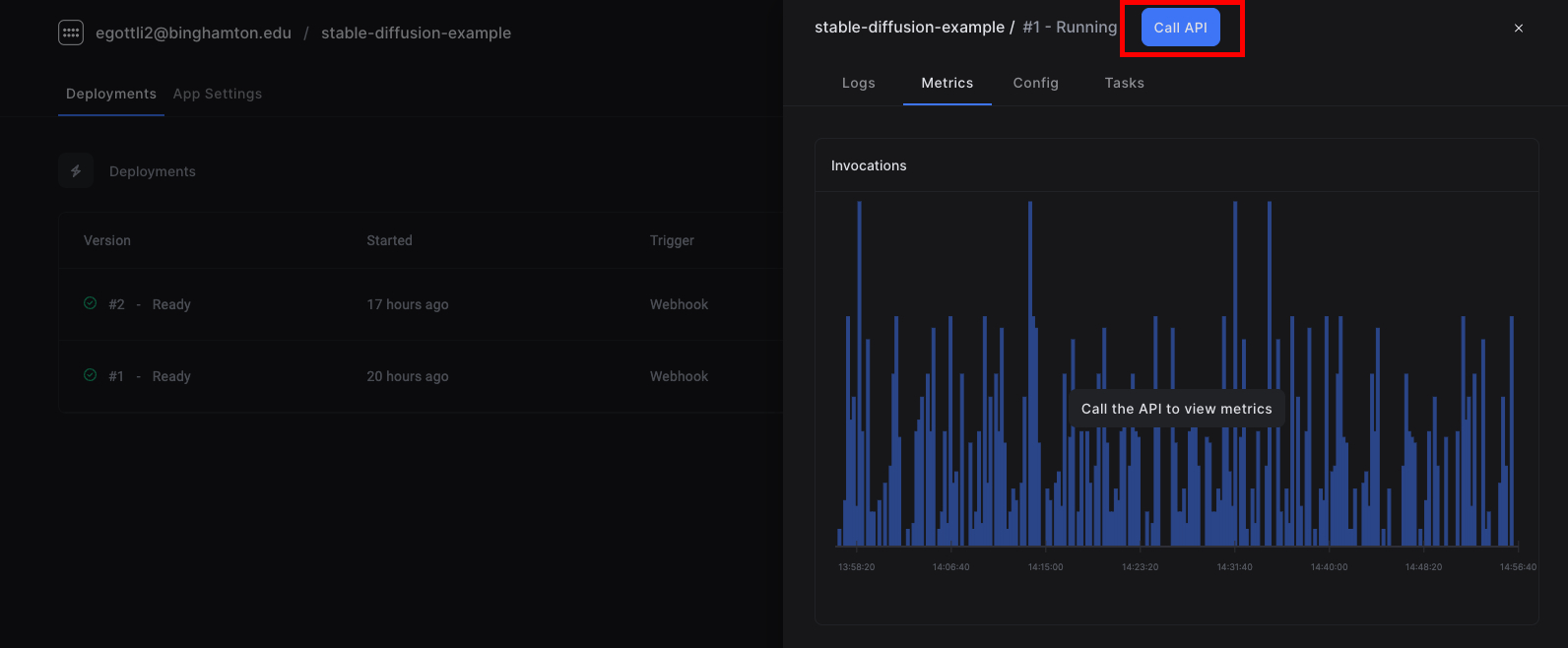 Paste the code into your terminal to make a request.
```sh theme={null}
curl -X POST --compressed "https://apps.beam.cloud/jrg5v" \
-H 'Accept: */*' \
-H 'Accept-Encoding: gzip, deflate' \
-H 'Authorization: Basic [YOUR_AUTH_TOKEN]' \
-H 'Connection: keep-alive' \
-H 'Content-Type: application/json' \
-d '{"prompt": "a renaissance style photo of steve jobs"}'
```
The API returns a Task ID.
```json theme={null}
{ "task_id": "edbcf7ff-e8ce-4199-8661-8e15ed880481" }
```
## Querying the status of a job
You can use the `/v1/task/{task_id}/status/` API to retrieve the status of a job. Using the task ID, here's how you can get the output with the API.
```sh theme={null}
curl -X GET \
--header "Content-Type: application/json" \
--user "{CLIENT_ID}:{CLIENT_SECRET}" \
"https://api.beam.cloud/v1/task/{TASK_ID}/status/"
```
This returns a `url` to the generated image in the `outputs` object.
```json theme={null}
{
"task_id": "edbcf7ff-e8ce-4199-8661-8e15ed880481",
"started_at": "2022-11-04T19:43:25.668303Z",
"ended_at": "2022-11-04T19:43:26.017401Z",
"outputs": {
"myimage": {
"path": "output.png",
"name": "myimage",
"url": "http://data.beam.cloud/outputs/6446df99cf455a04e0335d9b/jrg5v/jrg5v-0001/edbcf7ff-e8ce-4199-8661-8e15ed880481/output.zip"
}
}
}
```
Paste the code into your terminal to make a request.
```sh theme={null}
curl -X POST --compressed "https://apps.beam.cloud/jrg5v" \
-H 'Accept: */*' \
-H 'Accept-Encoding: gzip, deflate' \
-H 'Authorization: Basic [YOUR_AUTH_TOKEN]' \
-H 'Connection: keep-alive' \
-H 'Content-Type: application/json' \
-d '{"prompt": "a renaissance style photo of steve jobs"}'
```
The API returns a Task ID.
```json theme={null}
{ "task_id": "edbcf7ff-e8ce-4199-8661-8e15ed880481" }
```
## Querying the status of a job
You can use the `/v1/task/{task_id}/status/` API to retrieve the status of a job. Using the task ID, here's how you can get the output with the API.
```sh theme={null}
curl -X GET \
--header "Content-Type: application/json" \
--user "{CLIENT_ID}:{CLIENT_SECRET}" \
"https://api.beam.cloud/v1/task/{TASK_ID}/status/"
```
This returns a `url` to the generated image in the `outputs` object.
```json theme={null}
{
"task_id": "edbcf7ff-e8ce-4199-8661-8e15ed880481",
"started_at": "2022-11-04T19:43:25.668303Z",
"ended_at": "2022-11-04T19:43:26.017401Z",
"outputs": {
"myimage": {
"path": "output.png",
"name": "myimage",
"url": "http://data.beam.cloud/outputs/6446df99cf455a04e0335d9b/jrg5v/jrg5v-0001/edbcf7ff-e8ce-4199-8661-8e15ed880481/output.zip"
}
}
}
```